Are Digital Business Cards Safe? Privacy, Security and GDPR
Digital business cards are as safe as the service behind them and the choices you make on the card. They share only the details you publish. The risks to check are a public link, the data you collect from visitors, and where that data is stored. This article gives general principles, not legal advice.
For the basics of how a card works, read the guide on how digital business cards work.
Are digital business cards safe?
A digital card is a web page. Anyone who has the link, the QR code or a tap on the NFC tag can open it. That is the point of the card, and it is also its first privacy rule: publish only details you are happy to give to a stranger.
Three points tell you whether a card is safe to use:
- Card content. Does it show only a work email and a company phone? A home address or a personal mobile number is a choice to make with care.
- Card collection. If it has a form, the visitor's answers become data you hold and must protect.
- Service provider. The provider stores your card, your contacts and your account. Its hosting, its access controls and its policy matter.
A paper card has no such questions, but it cannot be updated and it cannot be taken back once handed out. A digital card can be edited or taken offline at any time, which is a safety advantage when a number changes or a colleague leaves.
Are digital business cards secure?
Security is the work of the provider and of you.
On the provider's side, look for these points:
- Encrypted connections. The card page should open over HTTPS.
- Access control. Your account should be protected by a password, and a team should have roles, so that each member sees the contacts they should see.
- Clear processors. The provider should say which companies handle data for it, such as hosting or payment.
- Deletion. You should be able to delete your account without asking permission.
On your side:
- Use a strong, unique password for your account.
- Remove a colleague's access when they leave, and take their cards offline.
- Keep the access tokens of your CRM connection private. If a person who knew a token leaves, replace it.
- Do not publish on a card an item you would not put on a website.
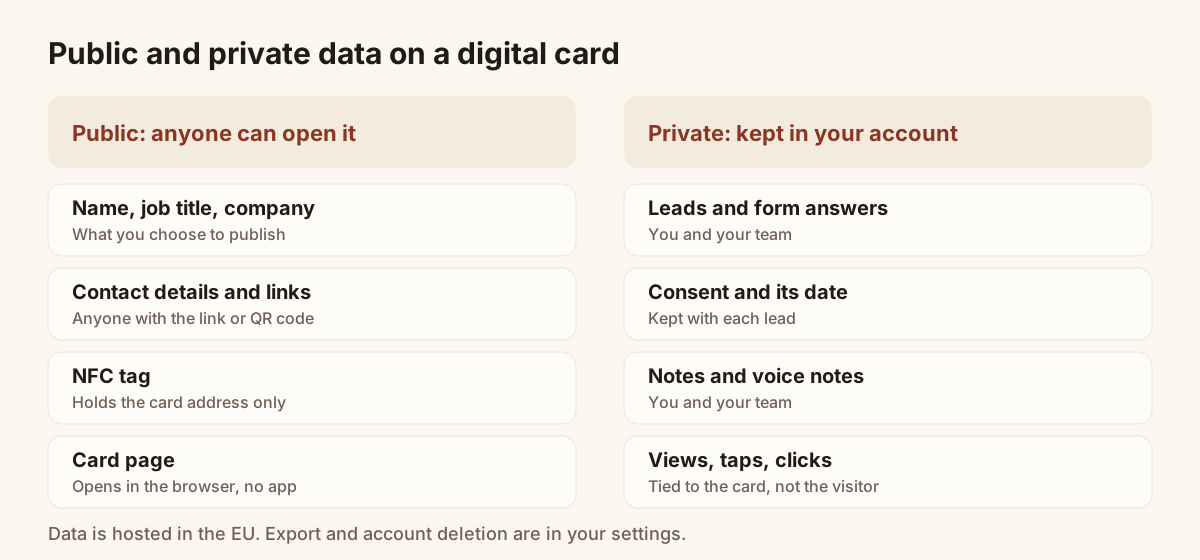
Public card on one side, private data on the other.
What data does a digital business card collect?
It depends on the card. A card without a form collects nothing from the visitor. A card with a form collects the answers the visitor types.
| Data | Where it comes from | Who sees it |
|---|---|---|
| Card details | You: name, job title, company, contact details, photo, links | Anyone with the link |
| Lead details | The visitor, through the form | You and your team |
| Consent | The optional box the visitor ticks | You and your team |
| Notes | You: written notes and voice notes on a contact | You and your team |
| Usage statistics | The card: views, taps, clicks | You |
In Piktechs, usage statistics such as card views, NFC taps, clicks and form opens are tied to the card, not to the identity of the visitor. The people who view a card are not identified. A visitor becomes known only when they choose to fill in the form.
The recipient of a card installs nothing. The card opens in the phone's browser, and the contact is saved in one tap.
Are digital business cards GDPR compliant?
No tool is compliant by itself. GDPR applies to the way you use it. A card with a form makes you a controller of the personal data you collect, which brings duties: a reason to collect, information for the visitor, a way to answer their requests, and care in how you store the data.
General principles that apply to a card used for lead capture:
- Collect the minimum. A name, an email and a short question are often enough.
- Inform the visitor. Say who you are and why you ask.
- Get consent for marketing. A box the visitor ticks themselves, with clear wording, is the usual approach. Do not pre-tick it.
- Keep proof. Record when and how the person agreed.
- Honour requests. Be able to find, correct, export and erase a person's data.
- Choose providers with care. Know where your provider stores data and who it works with.
Piktechs facts, from its own policy and product:
- Consent is recorded with each lead. The optional box to receive the card owner's offers is kept with the date and the wording accepted, as proof of consent.
- Data is hosted in the European Union. The database, authentication and file storage run with Supabase, in Ireland. Some other providers, such as payment or analytics providers, may process data outside the European Union, under the safeguards named in the privacy policy.
- Piktechs does not sell data. It relies on technical providers bound by data processing agreements, and the privacy policy lists them.
- The card and the site are in French and English.
- Export is available at any time. You can download your contacts as a CSV from Contacts.
- Account deletion is self-service. It is in the settings, and it permanently removes your cards, contacts, notes, statistics and files.
You stay responsible for how you use the leads. The product records consent. It does not decide for you whether you may send an offer. Ask your data protection officer or a lawyer for advice on your own case. For a QR code on a poster or a stand, see collecting contact information with a QR code.
Can someone steal my info from an NFC card?
An NFC tag stores a small piece of data. For a digital card, it is the public web address of the card, not your details. When a phone taps the tag, it reads that address and opens the page.
This has consequences:
- Reading the tag gives the address, nothing else. The details come from the card page, which is public by design.
- Anyone near the tag can read it. The range is a few centimetres, but the tag has no password. Treat the address as public.
- A tag can be overwritten if it is not locked. Someone could write another address on a blank tag. Check the page that opens after a tap, as you would check a link.
- A lost tag exposes nothing private. You can point the tag to another card, or take the card offline.
To go deeper on the technology, read the guide to NFC business cards.
Choosing a provider: questions to ask
Before you put a card in front of clients, send the provider a short list of questions. A serious provider answers them without effort.
- Where is the data stored, and in which country?
- Which companies process data on its behalf, and is there an agreement with each?
- Is consent recorded with each lead, with a date?
- Can I export my data without help from support?
- Can I delete my account myself, and what is erased?
- How are team roles handled when a member leaves?
Keep the answers with your own records. If your company has a data protection officer, share them.
A checklist for a safe digital card
- List the details on the card. Remove any you would not give to a stranger.
- Decide whether you need a form. If you do, ask only for the fields you will use.
- Add a consent box for marketing, not pre-ticked, with clear wording.
- Check where your provider hosts the data and read its privacy policy.
- Protect the account with a strong password.
- Give team members only the access they need.
- Know how to export and delete data.
- Review the card when a role or a number changes.
Is the idea still new to you, and would a definition of a digital business card help? You can create a free card and check these points on a real card.
Frequently asked questions
Can people see who I am sharing my card with?
Other people do not see your contacts. Your leads are visible to you and, on a team, to the members allowed to see them.
Does a digital business card track the people who view it?
Piktechs counts views, taps and clicks per card. It does not identify the visitor. A person becomes known only when they fill in the form.
Where is my data stored?
In Piktechs, the database and file storage are hosted in the European Union. Some providers, such as payment or analytics providers, may process data outside the European Union, with safeguards named in the privacy policy.
Can I delete my data?
Yes. You can export your contacts as a CSV at any time, and you can delete your account from the settings. Deletion removes your cards, contacts, notes, statistics and files, and cancels any active subscription.
Is this legal advice?
No. These are general principles. For your own situation, ask a data protection officer or a lawyer.
Read next
 Guide
How Do Digital Business Cards Work? QR Codes, NFC, Links and vCards Explained
QR code, NFC, link or vCard: see how digital business cards work, how contacts get saved on iPhone and Android, and how leads follow.
 Article
Digital Business Cards for Teams: Brand, Manage and Track Every Card
Roll out digital business cards to your whole team: one locked brand kit, roles, lead assignment and stats per card, from EUR 15 per seat.
 Article
Best Digital Business Card Apps, Compared Honestly
We compare the best digital business card apps on price, CRM sync, team features and GDPR, so you can pick the right one.
 Article
Digital business card app: the features to look for
Which features a digital business card app must have, which are useful and which are gimmicks, with a table to check any offer against.
 Article
How to Make an Electronic Business Card for Your Email Signature
Create an electronic business card for Outlook or Gmail, and compare it with a live card link in your signature that shows views and contact saves.
 Article
How to Create a Virtual Business Card for Email, Zoom and LinkedIn
Make a virtual business card you can share on Zoom, Teams, LinkedIn and email. Step-by-step guide with a free card and QR code tips.
Create your digital card
The Free plan includes one live card. No app needed for the people who receive it.