Best Digital Business Card Apps, Compared Honestly
The best digital business card app is the one that fits your use: a solo card, a sales team, a trade show, a CRM to feed. This page compares digital business card apps on price, CRM sync, team features and GDPR, with the Piktechs facts and the lines to read on any other vendor’s site, and gives twelve criteria to check before you choose.
For the mechanics every app shares (QR code, NFC, link, vCard), read the guide on how digital business cards work.
What is the best digital business card?
There is no single answer, because the apps do not solve the same problem. Almost all of them show your name, job title and links on a page opened by QR code, NFC or link. They differ on the steps that follow the scan.
Three questions separate them:
- How does the other person open the card? A card that opens in the browser and saves in one tap asks nothing of the person you meet. An install or a sign-up adds a step.
- Which data comes back to you? A card that only displays gives your details away. A card with a form brings back the details of the person you met.
- Where do the contacts go next? For one person, the phone’s address book may be enough. For a team, the contacts belong in the CRM the company already uses.
So the useful question is “the best digital business card for which need?”. The table below lists facts side by side. The sections after it match each need with the kind of tool that fits it.
How this comparison was built
You are reading a vendor’s page, so here are the rules we set ourselves.
- One source per vendor: its own website. A comparison cell states a fact only when it can be read on the vendor’s pricing or feature pages. No review site, no forum, no memory.
- Prices exactly as listed. A price appears with its currency and billing period, with the date it was read.
- No verdict on another vendor. This page does not rank the apps and does not judge their compliance or their hosting.
- No row we could not check. We publish the Piktechs column, which we can vouch for, and the line to read on any other vendor’s site for the same point.
The Piktechs column comes from our own pricing page.
Digital business card apps compared: price, CRM sync, team, GDPR
| Point to compare | Piktechs | Line to read on another vendor’s site |
|---|---|---|
| Free plan | 1 live card, no time limit, no credit card | Number of cards, time limit, card required or not |
| First paid plan | Pro: €9 a month, or €84 a year | Price per month and per year, with the currency |
| Team plan | Team: €15 per seat per month, 3 seats minimum | Price per seat, minimum number of seats |
| CRM sync | HubSpot and Odoo native, Zapier and Make by webhook, CSV export (Pro and Team) | Native connectors, and the plan that includes them |
| Offline capture | Yes: leads are kept on the device and sent when back online | Behaviour of the form with no network |
| Consent and hosting | GDPR consent recorded with each lead, data hosted in the EU | Consent record per lead, hosting region |
Piktechs prices as listed on our pricing page on 15 November 2026.
Fill the third column for each app on your shortlist: it takes a few minutes per vendor. The section “How to check a vendor’s pricing page” below lists the seven lines to read on each site.
Piktechs, line by line
- Free plan. One live card, forever, with QR code, NFC, link and contact save as a vCard. Drafts are unlimited.
- Pro. €9 a month or €84 a year: five live cards, the qualification form on the card, Contacts with tags, notes and follow-up reminders, Lead Scanner for paper cards, analytics and CRM sync.
- Team. €15 per seat per month, three seats minimum: five cards per seat, a locked brand kit, your own domain, roles and permissions, each lead assigned to a member.
- Organisation. On quote, for several teams under one contract.
- Trial. 14 days on Pro and Team, with a payment method.
- CRM sync. HubSpot and Odoo receive name, email, phone, company and job title. Zapier and Make receive the full lead, with source, tags, notes and form answers.
- Recipient. The card opens in the browser and the contact is saved without installing an app.
Limits of Piktechs
A fair table also lists the points where Piktechs is not the right tool.
- There is no native Salesforce connector. Salesforce is reached through Zapier or Make.
- Piktechs does not read the badges issued by event organisers.
- Piktechs sells no physical NFC card. You link an NFC tag you already own.
- There is an Android app on Google Play and no iOS App Store app. On an iPhone, Piktechs runs in the browser.
- Voice notes are recorded, not transcribed.
- The form, Contacts, Lead Scanner and analytics belong to Pro and Team, not to the Free plan.
- Piktechs is not a CRM. It feeds the CRM you already use, or a CSV export if you have none.
What’s the best digital business card for your need?
Four needs cover most buyers. For each one, here are the lines of the table that count and the kind of tool that fits.
| Need | Lines that count | Kind of tool that fits |
|---|---|---|
| One person sharing their details | Free plan, save to contacts, QR code | A card app with a free plan that has no time limit |
| A field sales team | Team plan, brand kit, lead assignment, CRM sync | A team tool that sends each lead to the CRM |
| A trade show stand | Form on the card, paper card scan, offline capture | A lead capture tool that works without signal |
| A company that wants one brand on every card | Brand kit, own domain, roles | A team tool with central control of the cards |
One person sharing their details
You want a clean card that saves well, and no spend. Look at the free plan first: how many cards, for how long, with which ways to share. A free plan with one card, a QR code, a link and the contact save covers this need. Whether the cost of a paid plan pays off for you is the subject of are digital business cards worth it?.
The Piktechs Free plan fits here. To build the card, follow how to create a digital business card.
A field sales team
Here the card is a way to capture leads, and the price per seat counts more than the price of the first plan. Four lines decide: a brand kit that keeps every card on brand, the reassignment of leads when a rep leaves, analytics per rep, and the sync to the CRM.
Ask each vendor how a newcomer is added, how a card is switched off, and who receives the leads of a rep who left. The article on digital business cards for teams goes through this set-up.
Piktechs is built for this need: the Team plan assigns each lead to a member and sends it to HubSpot, Odoo, Zapier or Make.
A trade show stand
On a stand, three things happen in the same hour. Visitors scan your QR code, others hand you a paper card, and the hall network drops. A tool for this need has a form on the card, a scanner for paper cards and a way to keep leads while offline.
Check one more point with the event organiser: badges. Reading an organiser’s badge is a separate service, often rented from the organiser. Piktechs does not read those badges. It captures the lead through the card’s form, Lead Scanner or manual entry.
A company with a CRM
If your reps already work in a CRM, the card should feed it. Ask each vendor three questions: which CRMs are connected natively, which go through a webhook such as Zapier or Make, and which fields arrive in the CRM. A native connector to your CRM saves a set-up step. A webhook reaches many more tools and asks you to configure the scenario yourself.
The details for HubSpot are in how to connect a digital business card to your CRM.
12 criteria to choose a digital business card app
The table above gives the Piktechs facts on a given date. The twelve criteria below let you assess any app on your shortlist.
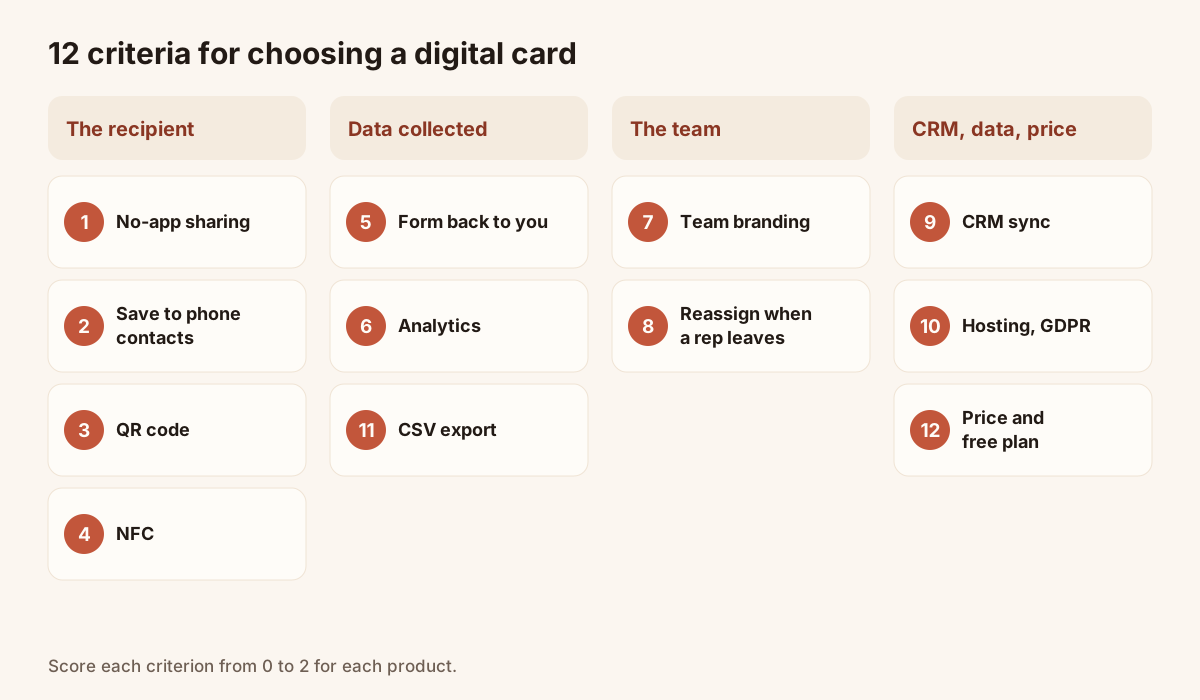
The twelve criteria, grouped by family.
| No. | Criterion | Question to ask the vendor |
|---|---|---|
| 1 | Sharing without an app | Does the person open the card in their browser, with no account and no install? |
| 2 | Save to contacts | Does one button add name, photo, job title and links to the address book, on iOS and Android? |
| 3 | QR code | Is the QR code provided, downloadable and usable in print? |
| 4 | NFC | Is tap sharing supported, and is there a fallback for phones that do not read it? |
| 5 | Form on the card | Can the other person leave their details, and can you ask your own questions? |
| 6 | Analytics | Can you see views, saves, clicks and leads per card? |
| 7 | Team branding | Can you lock logo, colours and layout for everyone? |
| 8 | Reassignment | Can a card and its leads move to someone else when a rep leaves? |
| 9 | CRM sync | To which tools, natively or by webhook? |
| 10 | Hosting and GDPR | Where is the data hosted, and is consent recorded with each lead? |
| 11 | Export | Can you take your contacts out as a CSV at any time? |
| 12 | Price and free plan | Which features does the free plan include, and how much does each extra user cost? |
Copy the table into a spreadsheet and score each app from 0 to 2 on every line: 0 if the criterion is missing, 1 if partial, 2 if complete. Then give more weight to the criteria that match your need.
The recipient (criteria 1 to 4)
Your card is opened by people you have just met, often standing, with one free hand. Test the journey on a phone that is not yours: scan the QR code, open the card, save the contact. Note every screen that stands between the scan and the saved contact.
For NFC, check that a fallback exists. Not every phone reads NFC, so the QR code and the link must always work. The guide on NFC business cards explains the tap and its limits.
The data you collect (criteria 5, 6 and 11)
The form turns a card that displays into a card that captures. Check that you can choose the fields, keep the form short and collect consent. Analytics should stay simple: views, saves, clicks, leads. Export is your insurance: even if you plan to stay, make sure you can leave with your contacts.
The team (criteria 7 and 8)
These two criteria weigh little for one person and a lot for a team of five or more. A locked brand keeps every card consistent. Reassignment keeps the contacts in the company when a rep leaves.
CRM, data and price (criteria 9, 10 and 12)
Ask which sync is native, which goes through a webhook and which does not exist. On data, ask where it is hosted and whether consent is stored with each lead: you collect personal data, and the responsibility is yours. On price, read three numbers: the content of the free plan, the first paid tier, and the cost of each extra user.
How to check a vendor’s pricing page
A comparison page ages, this one included. Before you sign, spend five minutes on each vendor’s own site and read seven lines.
- The free plan. Number of cards, time limit, features left out.
- The first paid plan. The price, its currency, and whether the amount shown is billed monthly or yearly.
- The team plan. The price per user, the minimum number of seats, and any “contact sales” tier.
- The trial. Its length and whether a payment method is asked.
- The integrations page. Your CRM by name, native or through a webhook.
- The security or privacy page. Where the data is hosted and how consent is handled, in the vendor’s own words.
- Hardware. Whether an NFC card or another accessory is sold separately, and at which price.
Write each answer in the scoring grid of the twelve criteria. If a vendor’s site does not answer a line, ask its sales team in writing and keep the reply.
Three mistakes when you choose
- Choosing on design. Templates look alike from one app to the next. Choose on the recipient’s journey and on the data you get back.
- Forgetting the day a colleague leaves. Ask the reassignment question before you buy.
- Testing on your own phone only. Test on an iPhone and on an Android phone that are not signed in to your account.
If you hesitate between two apps, start each on its free plan with a single card and run the same test with the same person. To see the Piktechs offer on each criterion, open the page on digital business cards, start on the Free plan, or book a demo for your team.
Frequently asked questions
Is a free digital business card enough?
For one person who shares their details, often yes. Check how long the free plan lasts, how many cards it allows and which features are left out. The Piktechs Free plan includes one live card with no time limit. The form, Contacts and analytics are on Pro and Team.
How much does a digital business card app cost?
It depends on the vendor and on the number of users. Read the free plan, the first paid tier and the price of each extra user. Piktechs costs €0 on Free, €9 a month or €84 a year on Pro, and €15 per seat per month on Team, from three seats.
Does the person I meet need an app?
It depends on the app you choose, and it is the first criterion to test. With Piktechs, no: the card opens in the phone’s browser from a QR code, an NFC tap or a link, and the contact is saved in one tap.
Read next
 Guide
How Do Digital Business Cards Work? QR Codes, NFC, Links and vCards Explained
QR code, NFC, link or vCard: see how digital business cards work, how contacts get saved on iPhone and Android, and how leads follow.
 Article
Digital business card app: the features to look for
Which features a digital business card app must have, which are useful and which are gimmicks, with a table to check any offer against.
 Article
A digital business card for field sales reps
Functions of a field sales rep’s digital business card: share in meetings, bring back a form, trigger follow-ups and be managed across the whole team.
 Article
Are Digital Business Cards Worth It? Costs, ROI, Pros and Cons
Paper vs digital business cards: costs, a method to work out ROI with your own numbers, pros and cons, and who should switch.
 Article
How to Create a Digital Business Card (Step by Step, Free)
Create a free digital business card in 5 steps: pick a layout, add your links, share it by QR code or NFC. No app needed for the people you meet.
 Article
How to Create a Contact Card on iPhone and Android (and Share It)
Set up your contact card on iPhone or Android, share it with NameDrop or a QR code, and know when a digital card works better.
Create your digital card
The Free plan includes one live card. No app needed for the people who receive it.