Trade show lead generation: the complete guide
Trade show lead generation means collecting visitors' details at your stand, noting their need on the spot, then sending them to your CRM for a follow-up within 48 hours. This guide follows the steps in order: preparation, capture, qualification, signal, consent, CRM sync, follow-up and measurement.
Trade show lead generation: goals and budget
Before choosing a tool, decide how you will use the contacts. A show can serve several goals, and each one calls for a different kind of capture.
Set the goal of the stand
Four goals come up most often:
- Sales opportunities. You look for visitors with a need and a deadline.
- Existing customers. You look for meetings and notes on their situation.
- Resellers or partners. You look for a few precise profiles.
- A contact base. You accept less qualified profiles to nurture later.
Pick one main goal, two at most. It sets the number of form questions, the qualification effort and the measure of success. A stand aiming at opportunities asks about budget or timing. A stand building a contact base can settle for name, company and email.
Set the budget and the team's time
You already know the usual costs of a show: space, stand, travel, hotel, reps' time. Lead capture adds to them. Before you sign, add up the cost of each capture method:
- the organiser's badge reader rental, priced differently at each show;
- a capture tool subscription, per rep on the stand;
- printing the QR code for the stand and the badges;
- the time spent typing or sorting after the show.
A phone-based tool keeps hardware to a minimum. Piktechs needs no device: the Team plan is billed per seat, with a minimum of 3 seats, and you can add seats before the show and remove them afterwards. The plans are listed on the Piktechs pricing page.
Write the success measure before opening day
Write down three measures now: leads captured, meetings booked, opportunities opened in the CRM. Without a starting point, nobody can judge the show. The measurement chapter below explains how to set your own targets from past shows.
Preparing lead capture before the show
Capture is won before the doors open. Three jobs fill the weeks before: meetings, the form and the roles.
Book meetings before the show
Write to customers, prospects and CRM contacts as soon as the date is confirmed. Offer a precise slot, not a vague "come and see us". An invitation with a booking link saves exchanges. Each meeting booked is a lead before day one.
For methods to use before, during and after an event, the article on how to collect leads at trade shows describes fifteen methods with their effort and equipment.
Build the qualification form
The form sets the information each visitor leaves. Two rules are enough:
- Few fields. Every extra field loses answers. Name, email and two or three qualification questions cover the essentials.
- Choice questions. A list of answers takes one tap. A free text field is hard to fill standing up with a phone in hand.
Examples of qualification questions: the main need, the project deadline, the visitor's role in the decision. The full method for choosing criteria is in the guide on how to qualify sales leads.
In Piktechs, you build the form in the Forms screen. You link some fields to contact details (name, email, company) and the others become qualification questions. You then turn it on for your team's cards, one by one or all at once. Forms are available on the Pro and Team plans.
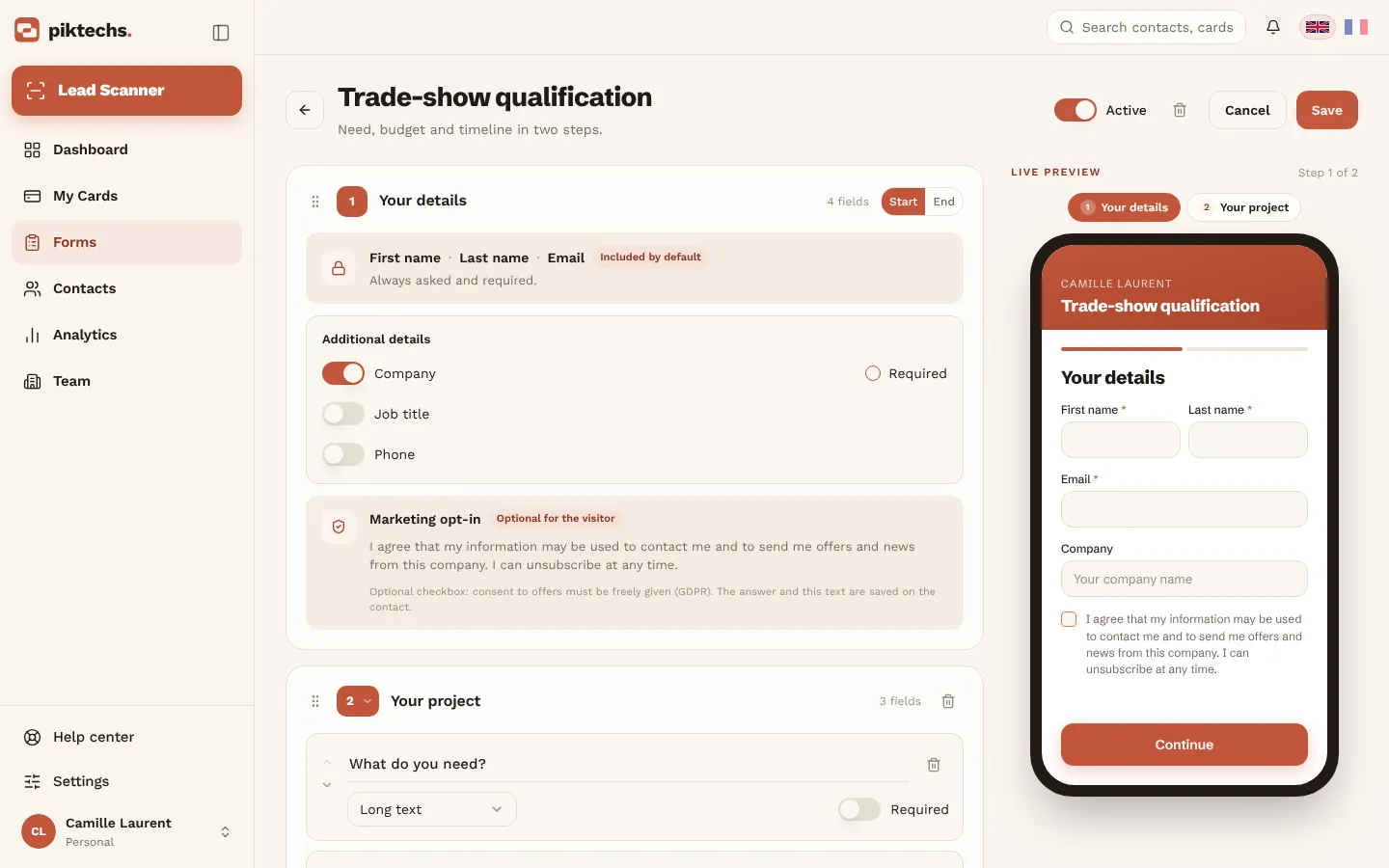
Piktechs screen, sample data.
Assign roles on the stand
A stand with no roles falls apart when footfall rises. Give out three jobs, even in a team of two:
- Welcome starts the conversation and guides the visitor.
- The rep leads the exchange, then qualifies: priority, tag, note.
- The data owner checks at the end of the day that leads are complete and reminders are set.
On the Team plan, each lead is assigned to a member or a group, and roles set the access of each member. Admins see every lead of the show in a shared list. A locked brand kit keeps every card of the team consistent.
Test the day before
The day before, run a full checklist. The diagram below summarises it.
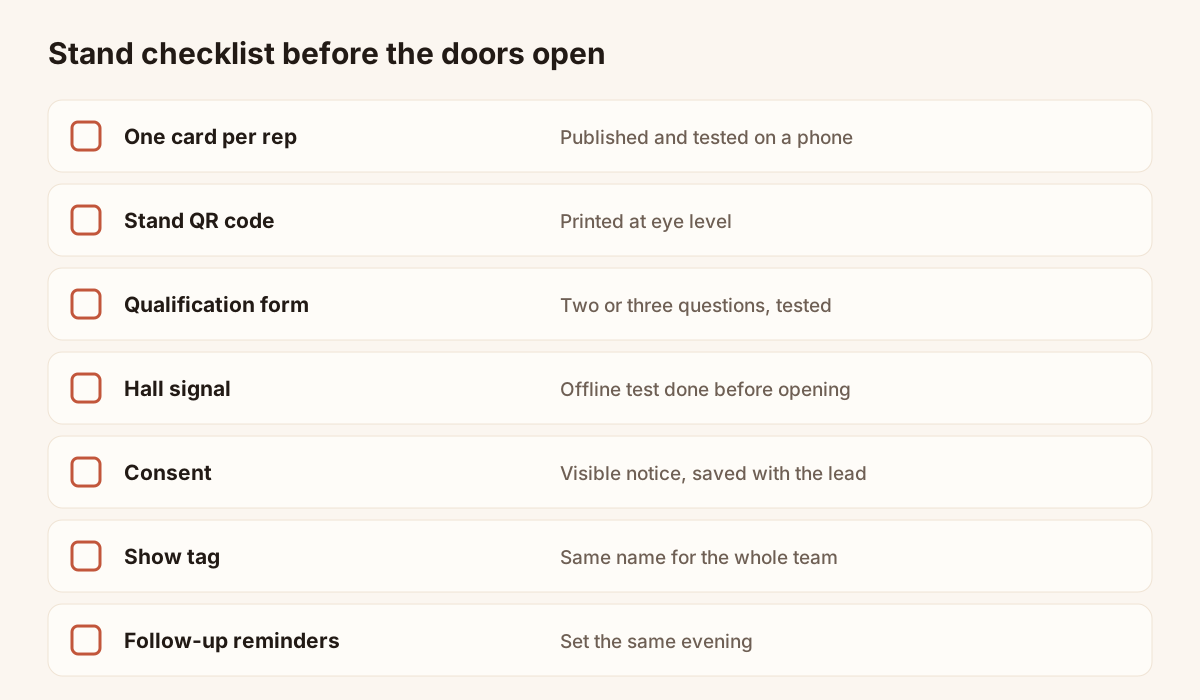
Seven points to tick before the doors open.
Scan the stand QR code yourself with two different phones. Fill in the form as a visitor would. Check that the lead appears in the contact list with its answers.
Lead capture tools and methods on the stand
No single method covers every visitor. A rushed visitor refuses a form. Another would rather hand over a paper card. A third has a flat battery. Combine three or four methods.
The organiser's badge scanner
The badge scanner, or lead retrieval, is a service sold by the organiser. You scan the code on the visitor's badge and receive their registration record. It identifies people quickly, but it says nothing about their need or timing. How it works, how it is priced and which data it returns are covered in the article on lead retrieval. Whether to rent one is covered in the article on the trade show badge scanner.
Piktechs does not read organiser badges. If you rent a reader, you keep the organiser's tool for that share of leads and bring its lists together with Piktechs leads in your CRM or a spreadsheet, using email as the common key.
Scanning paper business cards
Many visitors hand over a paper card. Photograph it with the Lead Scanner: it reads name, job title, email and phone, then creates the contact. You check the fields, add a note or a priority and save.
For a clean scan, lay the card flat, well lit, fill the frame and avoid glare. HEIC images are not supported: use JPEG. The guide on how to scan business cards covers OCR reading, its limits and how to process a pile of cards after the event.
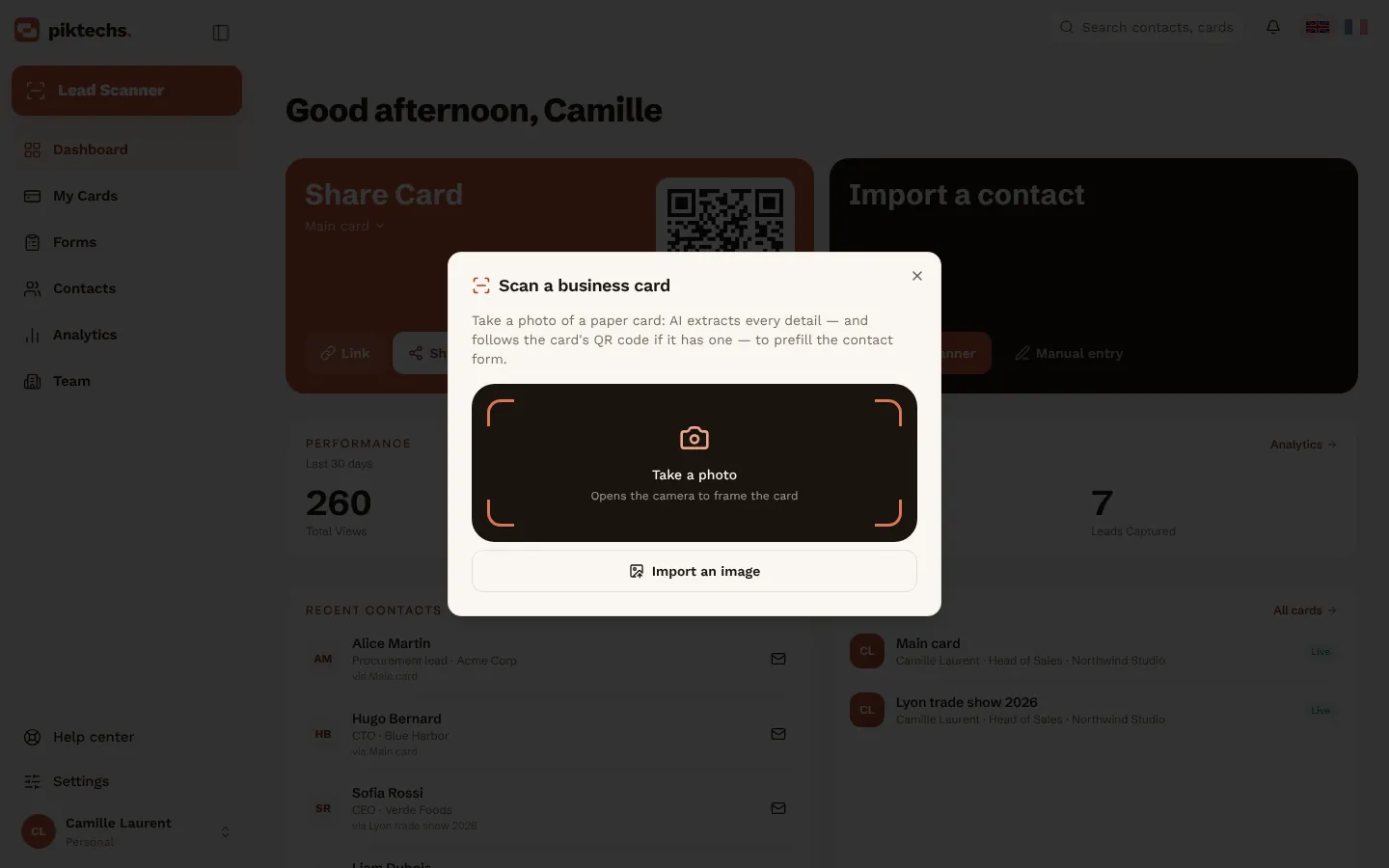
Piktechs screen, sample data.
The Lead Scanner is included in the Pro and Team plans. Piktechs does not replace the paper card: your reps can keep handing them out, and the Lead Scanner reads the ones they receive.
A digital card shared by QR code or NFC
Each rep shares their own digital card. The visitor scans the QR code with their phone camera, or holds their phone against an NFC support. The card opens in their browser, with no app to install. They save your details in one tap and leave theirs in the card's form.
The QR code and the link work straight away. NFC is one more way to share, on recent iPhone and Android phones. Piktechs sells no physical NFC card: you link to one of your cards an NFC tag that you get elsewhere. The code always leads to the same card, so updating your details needs no reprint. The guide to QR code business cards covers this in detail.
At a show, a digital card has a practical advantage: a visitor with no paper card can still leave their details.
The stand QR code
The stand QR code leads to a short form. It helps when the whole team is busy: visitors serve themselves. Print it on the banner, the counter and the team badges. Place it at eye level and leave a white margin around the code.
Add a short line next to it that states the exchange: "Scan to get the product sheet" or "Scan to book a meeting". A QR code with no line is ignored.
A form on a tablet or phone
When a visitor talks for a while, the rep fills in the form with them. Answers are more complete and the rep adds a note straight away. Keep the same form as the QR code so every lead has the same fields.
Comparing the capture methods
The table compares the five methods on qualitative criteria. Effort is that of a team starting out.
| Method | Rep effort | Equipment | Data received | Need noted |
|---|---|---|---|---|
| Badge scanner | Low | Organiser's device or licence | Registration record | Rarely |
| Paper card scan | Low | Phone | Name, title, email, phone on the card | In a note |
| Digital card | Low | Phone | Visitor's details and answers | In the form |
| Stand QR code | None | Printed poster | Form fields | In the form |
| Assisted form | Medium | Phone or tablet | Form fields | In the form and a note |
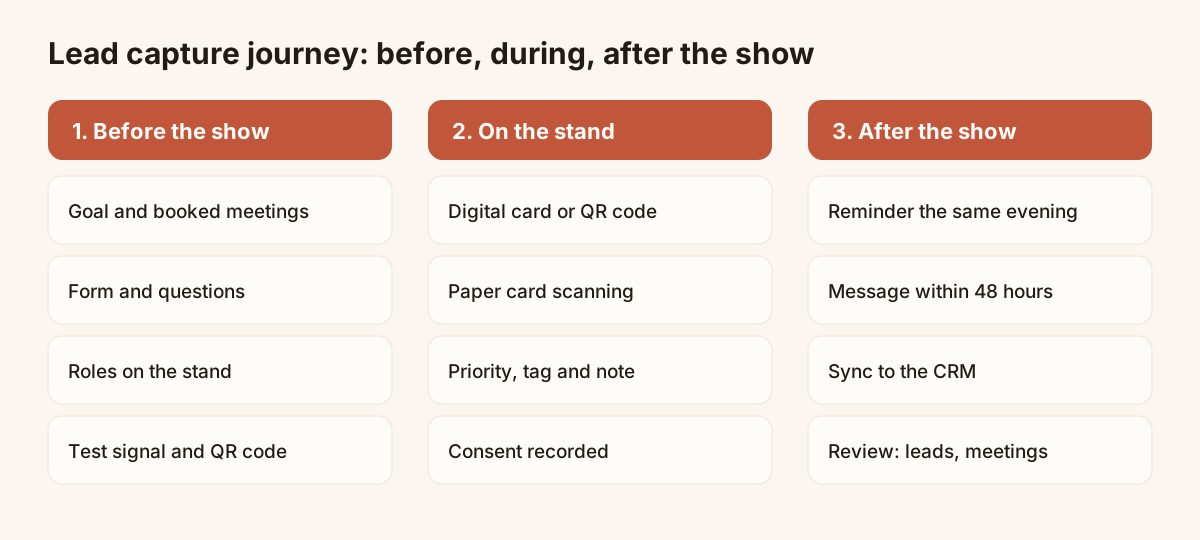
The three stages of a show and the actions in each.
To choose between a phone-based tool and an organiser licence, the article on choosing an event lead capture app gives a grid of criteria.
Qualifying leads on the spot
A contact with no context does not get followed up. Within the hour after a conversation, note three things: the need, the deadline and your commitment. By the end of the day, that memory is already blurred.
Ask three to five questions
The conversation can answer a few simple questions:
- What is the person's need or project?
- What is the deadline?
- Do they decide, or do they take part in the decision?
- Is there a budget?
- Which next step fits: demo, quote or call?
Do not ask all five if the exchange is short. Two answers are enough to set the priority. The guide on how to qualify sales leads explains the BANT grid and simple lead scoring.
Set a priority
Three levels are enough: high, medium, low. Define them in writing before the show so every rep judges the same way. For example:
- High: clear need, known deadline, meeting to book.
- Medium: probable need, vague deadline, simple follow-up.
- Low: curiosity, information sent, no active follow-up.
Note, tag and record a voice note
In Piktechs, you add a priority, tags, a note or a voice note to each contact right after the exchange. Voice notes are recorded as they are, up to two minutes, and replayed from the contact. They are not transcribed. To keep the text, type a short note as well.
Add the show's name as a tag on every lead. You can then find every lead of the event with one filter, and export the selection as CSV or sync it to your CRM.
Set the follow-up reminder now
For each high-priority lead, set a follow-up reminder before moving on to the next visitor, or at the latest the same evening. A reminder on the contact stops a lead slipping away when the return to the office is busy.
Lead capture without signal in the hall
Exhibition halls often saturate mobile and wifi networks. Plan for it before opening.
How offline capture works
Leads captured without signal are kept on the device and sent when the network returns. Notes can be taken offline. Leads left by a visitor on your card are queued on their phone, then sent when the network returns.
Without signal, the Lead Scanner falls back to a local read, which is less accurate. Proofread the record before saving, especially the email address.
Prepare the stand for a hall with no signal
- Open the app and load your forms before you walk into the hall.
- Run a test in airplane mode while you build the stand.
- Bring a power bank: the camera and screen drain a phone fast.
- Keep a pen and paper for a full outage. Enter the leads in the app that evening.
- At the end of the day, check that leads have reached the contact list: a lead waiting to be sent does not yet show for your colleagues.
Consent and GDPR on the stand
This section gives general principles. It does not replace a lawyer's advice. Rules on B2B prospecting depend on the country, the type of contact and the planned use.
Inform the person when you collect
A person whose details you collect must know who collects them, for which use and how to exercise their rights. On a stand, this means a short notice, visible on the form or on the QR code poster, with a link to your privacy policy.
Record consent with the lead
When consent is the legal basis you chose, you must be able to prove it. Piktechs records GDPR consent with each lead left on your card's form. Consent given orally, with no trace, is hard to prove: note it in the record.
Limit the data you collect
Ask only for the fields useful for the follow-up, in line with the data minimisation principle.
Hosting and deletion
Piktechs data is hosted in the European Union. You can export your contacts as CSV at any time and delete your account from the settings, which permanently erases cards and contacts. If a person asks for their data to be erased, delete their record in Piktechs and in your CRM.
The legal basis, retention periods and proof of consent are for your organisation to decide. Have your notices checked by whoever handles data protection.
Sending leads to your CRM
Piktechs does not replace your CRM. It captures and qualifies in the field, then feeds HubSpot, Odoo or another tool. Your CRM stays the system of record for sales follow-up.
The three ways to sync
| Route | Tools | Data sent |
|---|---|---|
| Native integration | HubSpot, Odoo | Name, email, phone, company, job title, and the message if it is mapped in the field mapping |
| Webhook | Zapier, Make | The full lead: source, tags, notes, form answers |
| CSV export | Any spreadsheet or CRM | The contact fields of the selection |
There is no native Salesforce connector: go through Zapier or Make. An owner or admin connects the integration in the Team section, under Integrations. New leads then go out automatically. The Sync button sends existing contacts to HubSpot or Odoo.
The CSV export of contacts has no column for phone, priority, tags or notes. To keep that information in another tool, prefer an integration or a webhook.
Map the fields
Before the show, match each lead field to a property in your CRM. Test with a dummy contact to check that name, email and company land in the right boxes. A mapping fixed after the show means reprocessing every lead.
Merge with the organiser's leads
With a rented badge reader, leads arrive by two routes. Bring them together in the CRM with email as the common key and keep the source of each lead. Piktechs does not import CSV files of contacts: the merge happens in your CRM or your spreadsheet.
Check before sending
Sort the list by the show's tag and remove duplicates. Check that each high-priority lead has an owner in the team. The guide on how to scan business cards also explains how to deduplicate a pile of scanned cards.
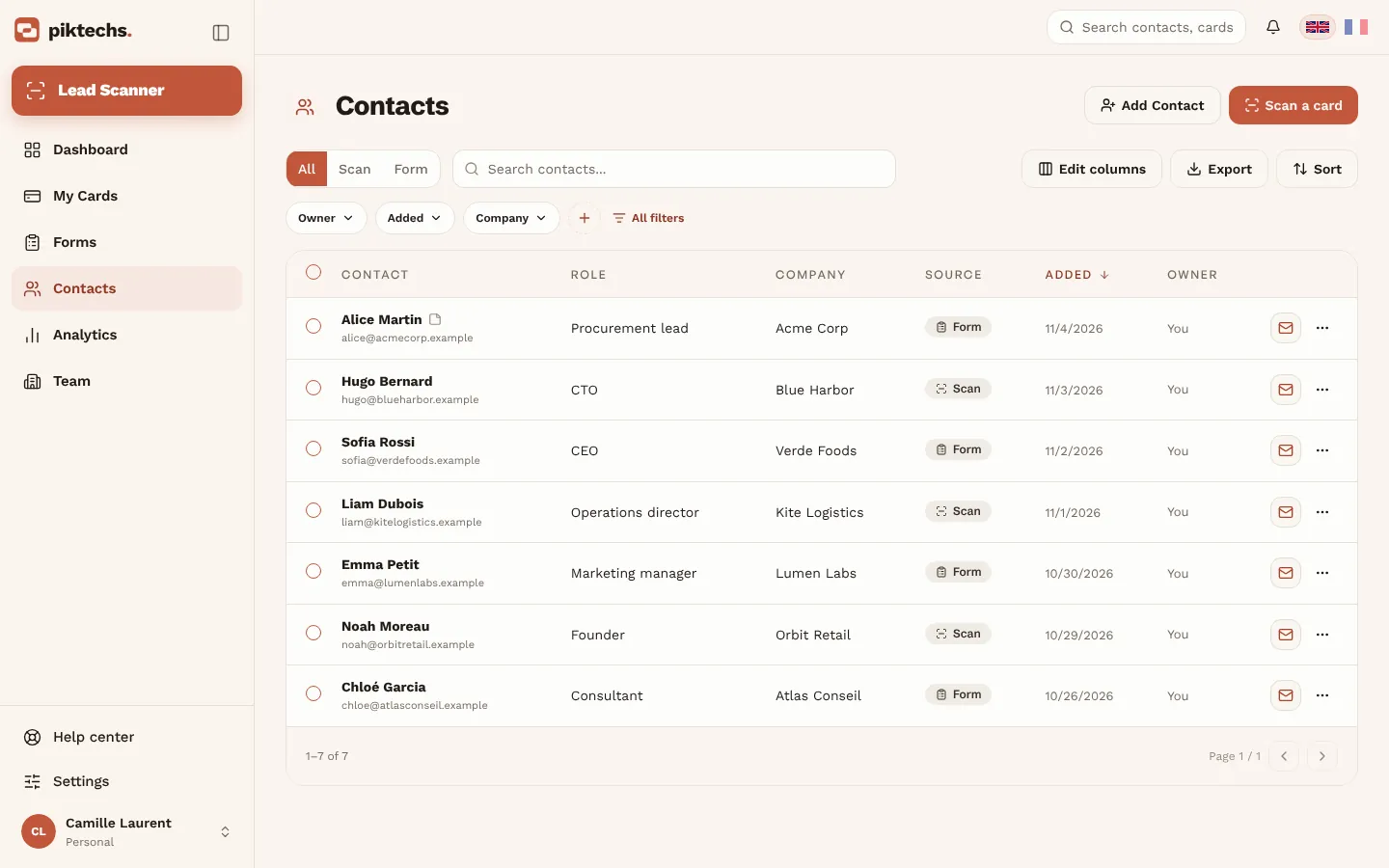
Piktechs screen, sample data.
Following up within 48 hours
Follow-up must stay close to the conversation. Aim for the two days after the show closes, before the visitor receives messages from your neighbours.
The follow-up calendar
- The same evening: set reminders on high-priority leads.
- The next day: send a short message that picks up the topic discussed, with the note taken on the spot.
- Within two days: send the leads to the CRM, filtered by the show's tag, and assign them.
- Within the week: call the high-priority leads who have not replied.
Write a useful follow-up message
A good message takes four sentences: a reminder of the exchange, an answer to the question asked, a proposed next step, a simple way to reply. A high-priority lead gets a personal message and a proposed slot. A low-priority lead gets the sheet you promised, without pressure.
Assign the leads
On the Team plan, each lead is assigned to a member or a group. Assign them on the day of the sync, not a week later. A lead with no owner is followed up by nobody. For another format, the article on conference lead capture adapts this method to short events.
Measuring the results of a trade show
Measuring a show helps you decide on the next one. This section gives a method, with no figures: targets come from your own past shows.
The three measures
| Measure | Question | Where to find it |
|---|---|---|
| Leads captured | How many contacts came in? | Contacts, filtered by the show's tag |
| Meetings booked | How many led to a planned exchange? | Calendar or CRM |
| Opportunities opened | How many became a tracked project? | CRM |
Record these three numbers, in this order. The step from one to the next shows where the show loses contacts: at capture, at follow-up or at qualification.
Set a target from your history
Look back at past shows: leads, meetings and opportunities for each. Use those numbers as a base. For a first show, the measure becomes the reference for the next.
Read the card statistics
Piktechs shows views and saved contacts for each card. Compare the cards of the team: a card with many views but few saves points to a form that is too long or an unclear offer.
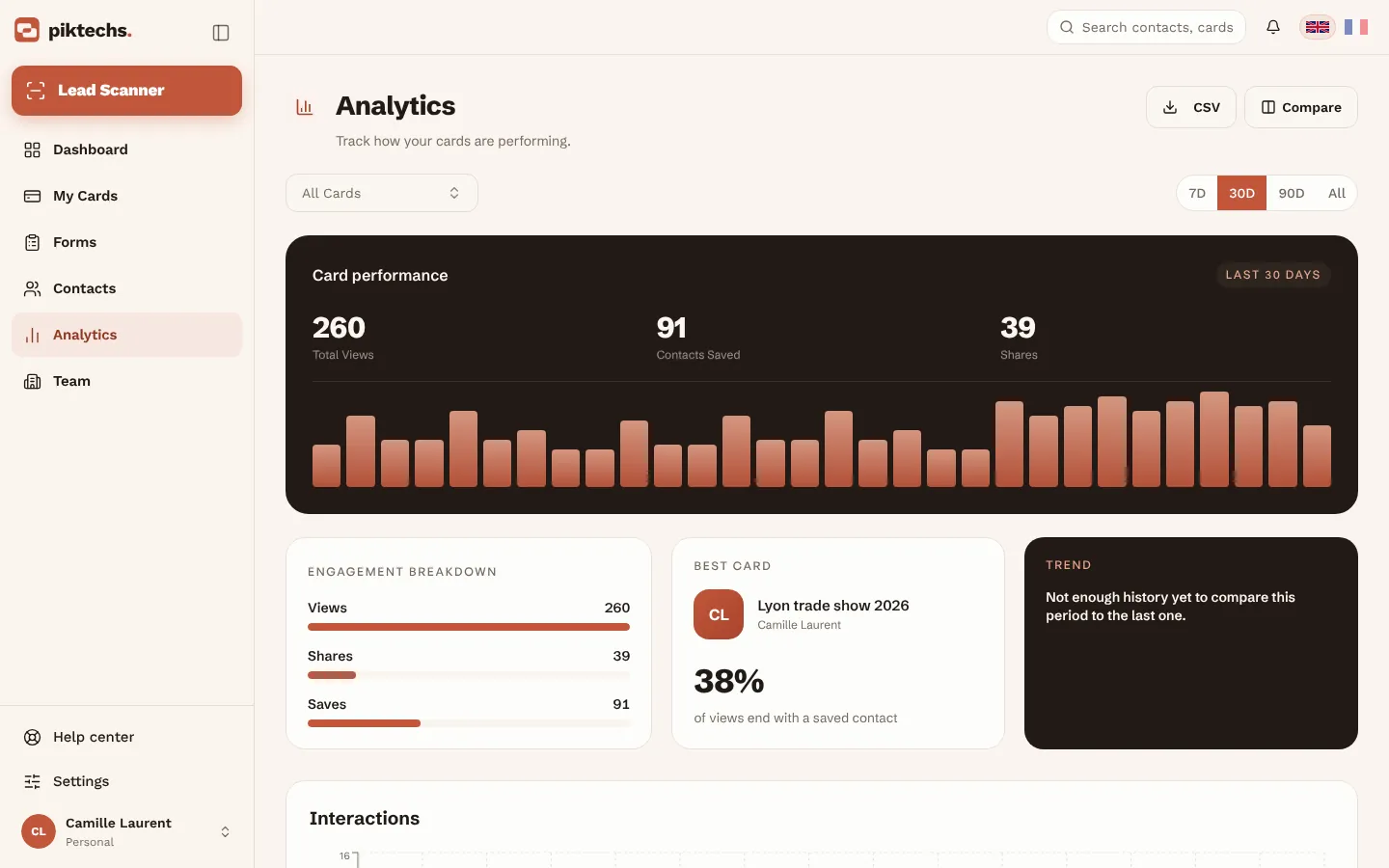
Piktechs screen, sample data.
Keep a written review
One page is enough: goal, the three measures, three things that worked, three to fix. File it with the form and the checklist so the next show's team starts from it.
Common lead capture mistakes
- A form that is too long. Every extra field loses answers. Keep name, email and two or three questions.
- No qualification on the spot. A contact with no note does not get followed up. Note the need and deadline within the hour.
- A single capture method. A rushed visitor refuses a form, another has no charged phone. Combine at least three methods.
- An untested QR code. Printed too small, weak contrast, broken link. Scan it with two phones before opening.
- No show tag. Without a tag, leads mix with those of the year. Fix one name for the team.
- Consent not recorded. A missing notice or missing proof exposes your company. Have the notice checked.
- Late follow-up. Each day of delay moves the conversation further away. Set reminders the same evening.
- Leads with no owner. A contact nobody owns is followed up by nobody. Assign at sync.
Next steps with Piktechs
The trade show lead capture page presents the full journey: one card per rep, the qualification form, the Lead Scanner for paper cards, offline capture and sync to HubSpot, Odoo, Zapier, Make or CSV. The Team plan costs €15 per seat per month, with a minimum of 3 seats and a 14-day trial for a first subscription.
Frequently asked questions
How do you succeed at trade show lead generation?
No single method is enough. Combine a digital card shared by QR code, paper card scanning and a short form: a phone alone covers most visitors. Add the organiser's badge scanner if footfall is very high and the price is justified.
Do I need to rent the organiser's badge scanner?
Not necessarily. It identifies visitors quickly, but it does not note their need. Piktechs does not read organiser badges: if you rent a reader, bring its lists together with Piktechs leads in your CRM or a spreadsheet, using email as the common key.
How do I capture leads when the hall has no signal?
Leads captured without signal stay on the device and are sent when the network returns. The Lead Scanner then falls back to a local read, which is less accurate: proofread the record before saving. Test in airplane mode while you build the stand.
When should I follow up after a trade show?
Within 48 hours of the show closing. Set reminders on priority leads the same evening, send a short message the next day and place the leads in the CRM within two days.
Does Piktechs replace my CRM for trade show leads?
No. Piktechs captures and qualifies leads in the field, then feeds HubSpot, Odoo or another tool through Zapier and Make. There is no native Salesforce connector. With no CRM, the Contacts list and CSV export are enough to work.
Read next
 Article
Digital Business Cards for Trade Shows: Capture Every Lead at Your Stand
Use digital business cards and a stand QR code to capture, qualify and sync trade show leads to your CRM, with no badge reader to rent.
 Article
How to choose an event lead capture app
Ten criteria and a scorecard to compare event lead capture apps: offline mode, card scanning, qualification, CRM sync, GDPR. Points to test, no brand list.
 Article
How to capture leads at trade shows: 15 methods that work
Fifteen ways to capture leads at trade shows, before, during and after: effort, equipment and data for each, plus follow-up within 48 hours.
 Article
Lead retrieval at trade shows: definition, how it works, costs
Lead retrieval is the contact-capture service an organiser sells to exhibitors. See how it works, how it is priced and which data it leaves out.
 Article
Conference lead capture without a booth
Speaker, attendee or sponsor: how to capture leads at a conference with no booth, using a QR code, a digital card and a follow-up within two days.
 Article
Trade show badge scanner: rent it or do without?
How a trade show badge scanner works, the visitor data it leaves out, and a checklist to decide whether to rent it, complete it or skip it.
 Article
Lead Capture Software: A Buyer’s Guide by Criteria
Choose lead capture software: five families of tools compared, ten criteria as a checklist, and a trial on one event. No brands, only points to test.
 Article
Trade show checklist: how to prepare, step by step
A trade show checklist by period: three months out, one month, the week before, each show day and after. Goals, team, lead capture and follow-up.
 Article
Trade show follow up email: method and 5 templates
Trade show follow up email method: when to write, how to sort leads, five templates, a short phone script and a three-week follow-up sequence.
Equip your team before the next show
Team gives each rep cards, forms and Lead Scanner, with lead assignment and CRM sync. 14-day trial.