Trade show checklist: how to prepare, step by step
A good trade show checklist works by period: set measurable goals three months out, book equipment and brief the team a month out, test lead capture the week before, keep a fixed routine each show day, then follow up straight away. Here is the full checklist, period by period.
It builds on our guide to trade show lead generation, which covers the whole journey from registration to CRM sync.
Which schedule works for a trade show checklist?
A trade show runs in five stages. Each stage ends with one deliverable: written goals, a stand and team that are ready, a capture set-up that has been tested, a daily routine, a follow-up plan. The diagram sums it up.
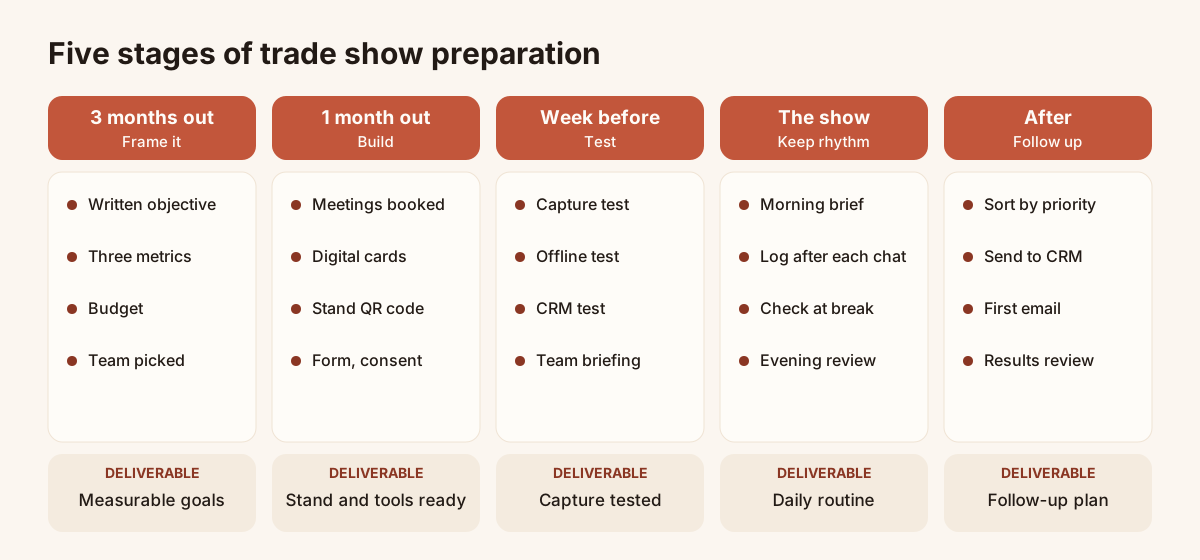
The five stages, with the deliverable of each.
The lead times are editorial guidance. A small regional show needs less notice than a large international one. Adjust the dates, keep the order.
Three months out: goals and framing
At this stage you decide why you are going, and you book the items with a long lead time: space, budget, meetings.
| Area | Actions |
|---|---|
| Goal | Write the show's goal in one sentence. Pick three metrics: leads captured, qualified leads, meetings booked. Set a target for each. |
| Audience | Describe the visitors you want to meet: job title, sector, company size. This description feeds your qualification questions. |
| Budget | List the costs: space, stand, travel, hotel, equipment, printing. Keep a margin for surprises. |
| Stand and equipment | Book the space, order or design the stand items, check delivery times. |
| Team | Choose who staffs the stand, on which shifts, in which role. |
| Lead capture | Choose the capture tool. For a team, Piktechs offers one digital card per rep, a form and a sync to your CRM. The Team plan starts at three seats. |
| Follow-up | Name the person who receives the leads and the person who follows them up. |
If you are comparing tools, the article on how to choose an event lead capture app lists the criteria.
One month out: stand, team and tools
One month out, the decisions are made. The rest is producing, configuring and briefing.
| Area | Actions |
|---|---|
| Meetings | Write to customers and prospects with a specific time slot at the stand. List the confirmed meetings. |
| Stand | Approve visuals and copy. Plan somewhere to rest phones or a tablet, and a power socket. |
| Equipment | Chargers, power banks, a tablet if you use one, posters, presentation material, samples. |
| Roles | Define who greets, who presents, who qualifies, who books meetings. One rep can cover several roles, but each role needs an owner on every shift. |
| Digital cards | Create one digital card per rep, with photo, job title, booking link and form. |
| Stand QR code | Generate the QR code of the card or form, download it as an image, and place it on the banner, the counter and the posters. |
| Form | Write two or three qualifying questions (see below). Keep everything else very short. |
| Consent | Write the consent wording and the purpose of collection. Piktechs records GDPR consent with each lead. |
| CRM | Connect HubSpot or Odoo, or plan on Zapier, Make or CSV export. Decide how the show is identified: a tag carrying its name. |
For the reps' cards, the article on digital business cards for trade shows explains how they work on a stand.
Write the qualification form
A short form gets completed. Add two or three questions that let you sort leads after the show, for example:
- What is your main need?
- How soon do you plan to decide: under a month, one to three months, later?
- Are you a decision maker, an influencer or just watching the market?
These are examples. Use your own company's criteria. The guide to lead qualification explains how to choose them.
How do you split team roles on the stand?
A stand without clear roles means visitors waiting and conversations getting lost. Assign roles per shift, not per person.
| Role | Mission |
|---|---|
| Greeter | Say hello, ask a first question, point the visitor to the right person or to the QR code. |
| Expert | Present the offer and answer technical questions. |
| Qualifier | Ask the form's questions, note the need, the timeline and the commitment made. |
| Meeting booker | Propose a time slot and put it in the calendar in front of the visitor. |
| Stand lead | Watch the numbers, manage breaks, handle surprises. |
On a small stand, two people cover all of these roles. The point is that nobody goes on a break without handing over each one. Consider also having one person who walks the aisle to invite passers-by.
The week before: tests and briefing
This week is for checking, not creating. Every test you run now prevents a failure on the stand.
| Area | Actions |
|---|---|
| Capture test | Scan the QR code with two phone models, complete the form, check that the lead appears in Contacts with its answers. |
| Offline mode | Turn off mobile data on one phone, capture a test lead, restore the connection and check that the lead arrives. A lead captured without signal is kept on the device and sent when the connection returns. |
| Sync test | Send a test lead to your CRM and check the source, answers, note and show tag. Delete the test lead afterwards. |
| Team briefing | Gather the team for an hour: goals, audience, questions to ask, roles, shifts, logging rules. Everyone practises on a fictional lead. |
| Logging rule | Set the rule: each lead is saved and annotated within the hour after the conversation, with the need, the timeline and the commitment made. |
| Equipment | Pack, label, check batteries, print backup posters. |
| Plan B | Prepare a second printed QR code, a paper sign-up sheet and a power bank. |
| Follow-up | Draft your email templates in advance. The article on the trade show follow-up email offers five. |
Piktechs does not read organisers' badges. If you rent a scanner, plan this week how its lists will reach your CRM. The article on the badge scanner covers that decision.
During the show: day by day
Keep the same rhythm every day. It prevents omissions and keeps the team aligned.
| Moment | Actions |
|---|---|
| Before opening | Ten-minute brief: the day's meetings, priorities, roles. Check phones, QR code and connection. |
| During the day | Every conversation ends with a log entry: lead saved, priority, need, note or voice note. Voice notes are recorded, not transcribed. |
| At the break | Check that leads are arriving in Contacts. Fix obvious duplicates. |
| At closing | Fifteen-minute review: leads captured, priority leads, meetings booked, changes for tomorrow. |
| Evening | Schedule a follow-up reminder on each priority lead. Send confirmations for booked meetings. |
Day one, middle days, last day
- Day one: spot the gestures that work. Is the QR code noticed? Do visitors complete the form? Fix the display or wording at once.
- Middle days: hold the logging discipline. Tiredness lowers the quality of notes.
- Last day: chase missed meetings, sort the leads, and record the final figure for each metric.
After the show: the following week
The week after closing decides the value of the show. A conversation with no follow-up produces nothing. Sooner is better: aim for the same day for priority leads and two days at most for the rest. That is editorial advice, not a rule.
| Day | Actions |
|---|---|
| Day 0, evening | Short message to the hottest leads, quoting the note taken on the stand. |
| Day 1 | Sort every lead by priority. Sync to the CRM, filtered by the show tag. |
| Day 2 | First message to all leads, adapted to each category. |
| Days 3 to 5 | Calls to priority leads, meeting booking, documents sent as promised. |
| Day 7 | Results review: leads captured, qualified leads, meetings booked, compared with the goal. |
| Days 8 to 14 | Second follow-up for leads who have not replied. Debrief with the team. |
The five email templates and the three-week sequence are in the article on the trade show follow-up email.
How do you set measurable trade show goals?
A measurable goal is a number, a deadline and a way of counting. Here is a four-step method with no imposed benchmark: your numbers come from your own history.
- Start from the end result. How many meetings or sales must the show produce to pay for itself? Work backwards, using your own conversion rate if you know it.
- Pick three metrics. Leads captured measure volume. Qualified leads measure relevance. Meetings booked measure commercial progress.
- Define each metric in writing. A qualified lead, for example: a person with an identified need, a timeline and a decision maker. Without a definition, each rep counts differently.
- Assign and track. One goal per rep and one for the team. Read the figures every evening, not just at the end.
With no history, set a cautious first goal, measure it, and adjust at the next show. The first show's figures become the reference for the second.
In Piktechs, priority, tags and form answers let you count by category. The analytics screens are Pro and Team features.
The five most common preparation mistakes
- Going without a written goal. With no target, nobody knows whether the show worked. The review becomes a feeling.
- Discovering the capture tool on the stand. The first test belongs in the week before, with the real form, the real CRM and the network switched off.
- Asking too many questions. A ten-field form drives visitors away. Two or three qualifying questions are enough, the rest comes in conversation.
- Forgetting consent. Collecting without clear consent exposes the company and weakens the follow-up. Consent is recorded with the lead.
- Leaving follow-up until you are back. Back at the office, the inbox is full and the visitor has forgotten you. Prepare the templates and the calendar before you leave.
Frequently asked questions
How far ahead should you prepare for a trade show?
Start about three months out for goals, budget and booking. That is editorial guidance: a local show needs less notice, a large one may need more. Keep the order of the checklist steps.
Which equipment do you need for lead capture?
One phone per rep is enough, with a charger and a power bank. Add a printed QR code on the stand, a tablet if you like, and a paper plan B. For the card and the form, see the page on trade show lead capture.
Do you need consent to collect contacts at a trade show?
Yes, whenever you collect personal data for prospecting. Consent must be clear, with the purpose stated, and kept with the lead. Piktechs records GDPR consent with each lead.
Can you download the checklist as a PDF?
Not at the moment. The tables on this page can be copied into your usual tracking tool.
What if the network is poor in the hall?
Test offline mode the week before. A lead captured without signal is kept on the device and sent when the connection returns. Also prepare a printed QR code and a paper sign-up sheet as a backup.
Read next
 Guide
Trade show lead generation: the complete guide
Trade show lead generation, step by step: prepare the stand, capture leads, qualify on the spot, handle consent, sync to your CRM, follow up in 48 hours.
 Article
How to capture leads at trade shows: 15 methods that work
Fifteen ways to capture leads at trade shows, before, during and after: effort, equipment and data for each, plus follow-up within 48 hours.
 Article
Trade show follow up email: method and 5 templates
Trade show follow up email method: when to write, how to sort leads, five templates, a short phone script and a three-week follow-up sequence.
 Article
Digital Business Cards for Trade Shows: Capture Every Lead at Your Stand
Use digital business cards and a stand QR code to capture, qualify and sync trade show leads to your CRM, with no badge reader to rent.
 Article
How to choose an event lead capture app
Ten criteria and a scorecard to compare event lead capture apps: offline mode, card scanning, qualification, CRM sync, GDPR. Points to test, no brand list.
 Article
Lead retrieval at trade shows: definition, how it works, costs
Lead retrieval is the contact-capture service an organiser sells to exhibitors. See how it works, how it is priced and which data it leaves out.
Equip your team before the next show
Team gives each rep cards, forms and Lead Scanner, with lead assignment and CRM sync. 14-day trial.