Lead retrieval at trade shows: definition, how it works, costs
Lead retrieval is the contact-capture service a trade show organiser sells to exhibitors. You scan a visitor's badge with a handheld device or an app, and you get the details they entered at registration. The price varies from show to show. The visitor's actual need is something you still have to note down yourself.
For the full picture, read the complete guide: trade show lead generation.
What is lead retrieval?
The term covers any system that lets an exhibitor retrieve leads from the visitors who stop at the stand. At trade shows, it is almost always an organiser product, listed in the exhibitor manual next to power and furniture.
The idea is simple. Each visitor wears a badge with a code. You scan it, and the organiser's system sends back the visitor's record: name, company, job title, email, sometimes a phone number. You save typing time and avoid typos in email addresses.
The data you get depends entirely on the registration form the visitor filled in and on the fields the organiser agrees to pass on.
How a lead retrieval system works
The badge code usually holds only an identifier. The scanner or app sends it to the organiser's system, which matches it to the registration record. Three steps follow:
- Before the show, you order licences or devices and receive your access.
- During the show, each scan adds a line to your list, sometimes with a note or a few tick boxes.
- After the show, you download the export: in real time, every evening or several days later, depending on the terms.
The data belongs to the organiser's system first. You only really have it once the export arrives.
Who provides it and how it is billed
The provider is the show organiser, or a contractor they have chosen. You do not pick the tool: it is the event's tool.
Billing takes several forms, described in the exhibitor manual:
- a device rental for the length of the show;
- a licence per device for an app installed on your phones;
- a package that includes a number of devices, with a surcharge beyond that.
Prices vary from one show to the next and with the number of devices, so no average figure would fit your case. Ask for the price per device, and for the price of one more if you reinforce the team mid-show. Ask too whether the fee is added to your stand package or invoiced separately.
Qualification data missing from lead retrieval: need, priority, notes
The badge says who the visitor is. It does not give their need, their deadline, the decision maker or the commitments you made. That information is in the conversation, and it fades within hours.
Depending on the tool, you can add a short note or tick boxes. Test it at the demo with a full stand in mind: an entry that takes more than a few seconds will not get done on the fortieth visit.
There are also visitors without a badge to hand, people you meet in the aisles, and contacts who give you a paper business card. The scanner does not see them.
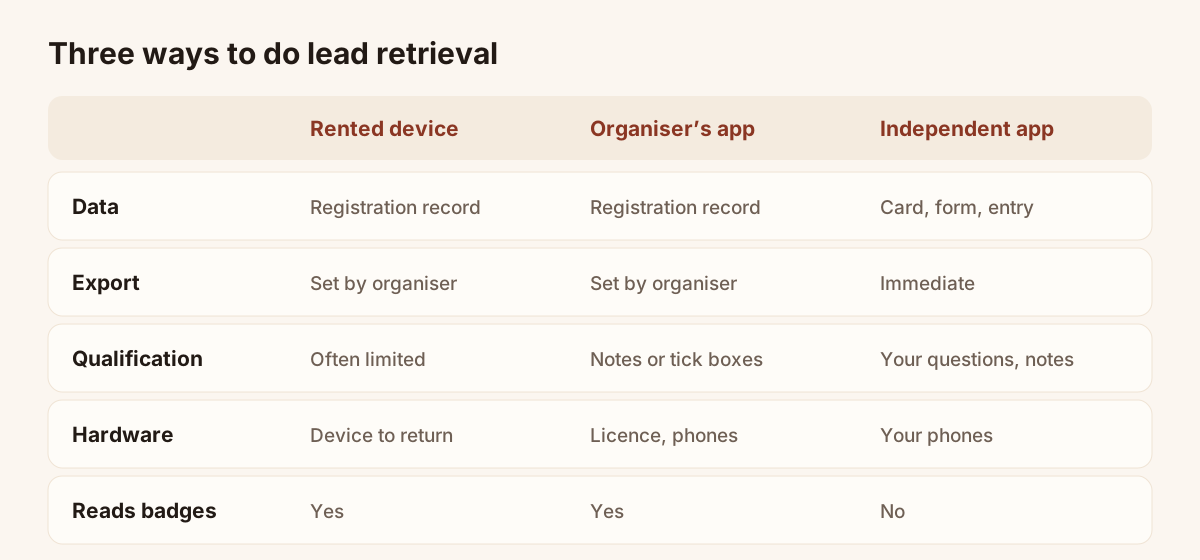
Data brought back by each option, as a rule of thumb. Check each line in your exhibitor manual.
The table gives the usual picture. Real terms change from one show to another.
| Rented device | Organiser's app | Independent app | |
|---|---|---|---|
| Data retrieved | Visitor's registration record | Visitor's registration record | Data entered by the visitor or by you: card, form |
| Export delay | Set by the organiser | Set by the organiser | Immediate, the data is yours |
| Qualification | Often limited | Notes or tick boxes, depending on the tool | Your own questions, priority, notes |
| Hardware | Device to collect and return | Licence, your phones | Your phones |
| Reads badges | Yes | Yes | No |
The last line matters. An independent app does not read the organiser's badge, and that is true of Piktechs.
Lead retrieval without hardware
With no device and no licence, you can still capture contacts with a phone. Three ways work together:
- Scan the paper business cards you are handed. The photo is read, the fields are filled in, you check and save. The business card scanner works this way.
- Share your digital card by QR code or NFC. The visitor opens it in their browser and leaves their details in a form.
- Enter a contact by hand when there is no card and no time for the form.
Piktechs runs in the phone's browser. It also keeps your leads when there is no signal, which helps in halls with poor coverage, and sends them as soon as the connection is back. Each lead can carry your questions, a priority, a note or a voice note. Voice notes are recorded, not transcribed.
Nobody's agreement is needed, but there is a limit: the visitor must hand over a card or agree to fill in the form. At a very busy show, that is slower than a badge scan. The article on 15 ways to capture leads at trade shows compares them one by one.
Matching the organiser's export and your leads in the CRM
Many teams combine the two. They rent the minimum number of licences to get visitor identity, and capture the conversations that matter with their own tool.
To be precise about the limits of Piktechs: it does not read badges and it does not import the organiser's CSV file. The two lists meet elsewhere, in your CRM or in a spreadsheet, where the email address is the key that matches a visitor scanned at the badge with the same visitor qualified on the stand.
Piktechs sends your qualified leads to HubSpot or Odoo, or to another tool through Zapier and Make. CSV export is always available. The full flow is on the trade show lead capture page. To decide whether to rent the scanner at all, read the article on the trade show badge scanner.
Frequently asked questions
Is lead retrieval mandatory for exhibitors?
No. It is an option the organiser sells. You can exhibit without it and collect contacts with business cards, a form or a digital card.
How much does lead retrieval cost?
The price varies with the show, the format (device or licence) and the number of devices. It is in the exhibitor manual. Ask for the price of an extra device as well.
What data do you get from a badge scan?
The registration record the visitor filled in, within the fields the organiser chooses to pass on: usually name, company, job title and email, sometimes a phone number. Check the field list before you order.
Can you do lead retrieval with your own phone?
Not to read badges: the code only opens in the organiser's system. You can, however, scan business cards and share your digital card with your own phone.
Read next
 Guide
Trade show lead generation: the complete guide
Trade show lead generation, step by step: prepare the stand, capture leads, qualify on the spot, handle consent, sync to your CRM, follow up in 48 hours.
 Article
Trade show badge scanner: rent it or do without?
How a trade show badge scanner works, the visitor data it leaves out, and a checklist to decide whether to rent it, complete it or skip it.
 Article
How to capture leads at trade shows: 15 methods that work
Fifteen ways to capture leads at trade shows, before, during and after: effort, equipment and data for each, plus follow-up within 48 hours.
 Article
Conference lead capture without a booth
Speaker, attendee or sponsor: how to capture leads at a conference with no booth, using a QR code, a digital card and a follow-up within two days.
 Article
Lead Capture Software: A Buyer’s Guide by Criteria
Choose lead capture software: five families of tools compared, ten criteria as a checklist, and a trial on one event. No brands, only points to test.
 Article
Trade show checklist: how to prepare, step by step
A trade show checklist by period: three months out, one month, the week before, each show day and after. Goals, team, lead capture and follow-up.
Equip your team before the next show
Team gives each rep cards, forms and Lead Scanner, with lead assignment and CRM sync. 14-day trial.