Digital Business Cards for Trade Shows: Capture Every Lead at Your Stand
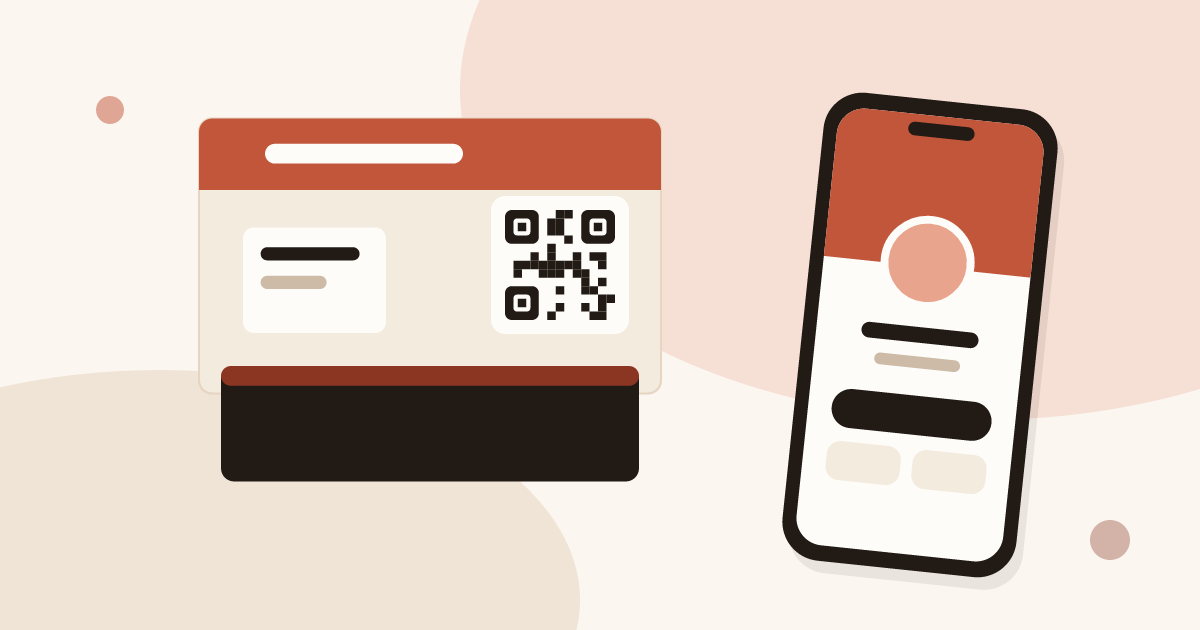
A digital business card gives each rep a personal page that visitors open by QR code, save to their phone and answer with a short form. Put the same QR code on the stand, qualify each lead on the spot and sync the list to your CRM. You rent no badge reader.
This article covers the card on the stand. For the whole event plan, read the guide on trade show lead generation.
How to collect leads at a trade show without a badge scanner
A badge scanner reads an identifier and returns the registration data the organiser holds. It is a good tool for identity, and it has limits: the export arrives on the organiser's schedule and the fields are fixed. The article on the badge scanner explains how it works and when to rent one.
Without a scanner, you collect leads with three things you already carry:
- A digital card per rep. The visitor scans it, saves your contact and leaves their details in your form.
- A QR code on the stand. It opens a card and its form, for the moments when every rep is busy.
- The Lead Scanner for paper cards. Some visitors hand you a card. You photograph it and the contact is created.
Each lead lands in Contacts with its source, the visitor's answers and your notes. Nothing depends on the organiser, and you have the data on the day.
One limit to state plainly: Piktechs does not read organiser badges. If the organiser sells lead retrieval and you rent it, keep it for the identity data. The organiser's export and your Piktechs leads meet in your CRM, matched by email. The article on lead retrieval describes that offer.
One card per rep, not one card for the stand
A shared card for the whole stand is tempting, and it loses information. You no longer know who spoke to whom, and a lead has no owner. Give each rep a card instead.
- Each card carries its own rep's name, photo and role. The visitor saves a real person.
- Each lead goes to the rep who shared the card. On Team, a lead is assigned to a member or a group.
- Every card follows the company's brand. A locked brand kit fixes colours, logo and layout, so the stand looks consistent whoever stands behind it.
- Stats are per card. You see views and saves for each rep after the show.
Drafts are unlimited. Only published cards count, and Team includes 5 live cards per seat.
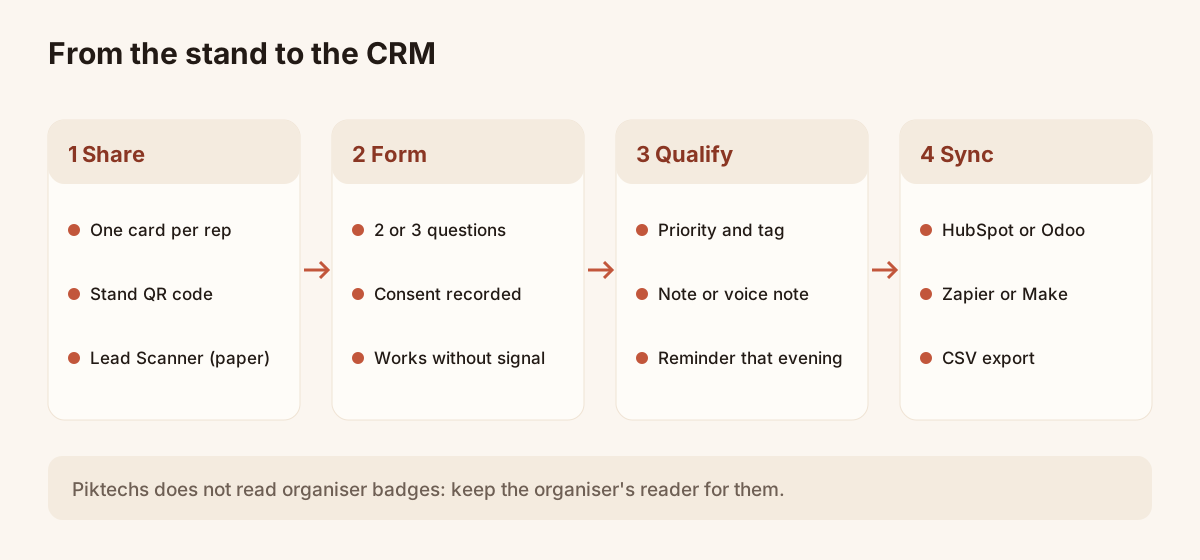
From the stand to the CRM: four steps, one list of leads.
How to share business cards at a trade show
Share your card at the end of a conversation, when the visitor has a reason to hear from you. Three ways work on a stand.
- Show the QR code on your phone. Turn the screen towards the visitor. They scan it with the camera, nothing to install.
- Send the link. If the visitor prefers, send the card by message or email right there. The article on how to share a digital business card lists every method.
- Tap a tag, if you have one. A phone can open a card from an NFC tag you have linked to it. Always keep the QR code as a fallback, because not every phone reads NFC.
The visitor opens your card in their browser and saves it in one tap. It becomes a native contact on iOS and Android, with your photo, role and links. In return, they leave their details in your form.
Paper still has a place. Reps can keep handing out printed cards, and the visitor who gives you theirs is covered by the Lead Scanner: photograph the card, check the fields it read, add a note and save.
How to use a QR code at a trade show booth
The stand's QR code does the work of a rep who is busy. It opens a card and its form, so a visitor who cannot wait still leaves their details.
Where to put it:
- On the banner, at eye height, large enough to scan from about arm's length.
- On the counter or a table stand, where visitors queue or wait for a demo.
- On the badges of your team, so that a visitor can scan from a conversation.
- On the screen you use for demos, in a corner of the last slide.
Add one sentence that gives a reason to scan, such as "Scan to get our catalogue and book a call". A bare code gets few scans.
Scan the printed code with two different phones before the doors open, and keep a spare on the table. For code format and destination, see the guide on QR code business cards and the article on collecting contact information with a QR code.
Form: the 2 or 3 questions to set once
The card's form is where a contact turns into a lead. Set it once, before the show, and keep it short. A visitor on a stand answers two or three questions, not ten.
Pick the questions a rep would ask in a conversation:
- What is the need, in a few choices (product A, product B, not sure)?
- What is the timeline (this quarter, this year, just looking)?
- What is the best way to reach them (email or phone)?
Link the fields to contact details (name, email, company) and keep the rest as qualification questions. The answers are saved on the contact. Consent is recorded on the form, which matters for GDPR, and data is hosted in the European Union.
The reply form is a Pro and Team feature. Forms created in a team workspace belong to the team: every member can use them, and admins can edit them. The "Card management" tab applies one form to several cards at once.
How to capture leads offline at an event
Halls are often poorly covered. Two behaviours help.
- The visitor's side. A lead left on your card is queued on the visitor's phone and sent when the network returns. The visitor has nothing to do.
- Your side. Leads that your reps capture without signal are kept on the device and sent when it is back online.
The Lead Scanner has one limit offline. Without signal it falls back to a local read that is less accurate, so proofread the record before saving. Photograph the card flat, in good light, with no reflections, and use JPEG images: HEIC is not supported.
Qualify on the spot, before the conversation fades
By the evening, you remember the first visitors and mix up the rest.
In Contacts, a rep can set a priority, add tags, type a note or record a voice note. A voice note is recorded as it is, up to two minutes, and played back from the contact. It is not transcribed. Add the show's name as a tag on every lead: it lets you filter that show's leads later, and export them in one click.
Keep it short: priority, tag, one line. If the stand is full, note the priority only and come back to it in the evening.
How to follow up with trade show leads
Follow-up decides whether the show pays. Visitors hear from several stands in the days after, and the first useful message gets read.
- Set a reminder the same evening. Each contact can carry a follow-up reminder. Schedule it before you leave the hall.
- Sort by priority. Start with the high-priority leads and message them within a day or two.
- Refer to the conversation. Your note or voice note gives you the sentence to open with.
- Send the promised document. A catalogue, a quote, a booking link.
- Sync to your CRM. HubSpot and Odoo connect natively, Zapier and Make by webhook, and a CSV export is always available. The CRM stays the system of record, and Piktechs feeds it with the source, answers and notes.
For the choice of tool and the criteria to compare, read how to choose an event lead capture app. The article on collecting leads at trade shows covers the methods side by side.
The cost of a team of five at one show
Team costs EUR 15 per seat per month, with a minimum of 3 seats and 5 cards per seat. Five reps on a show for one month cost EUR 75, with no commitment. The first subscription includes a 14-day trial.
An added seat is billed pro rata at once. A removed seat takes effect at the end of the paid period. The full grid is on the pricing page.
Stand checklist
Use this list as a pass before the doors open.
Two weeks before
- One card per rep, published, on the team brand kit.
- The form set with 2 or 3 questions, applied to every card.
- The show's name chosen as the tag everyone will use.
- The CRM connection tested with one test lead.
One week before
- The stand QR code printed for the banner, the counter and the badges, with a short promise next to it.
- Printed code scanned on two phones, in poor light.
- The Piktechs app open and signed in on each rep's phone.
- Roles checked: who is admin, who is a member.
On the morning
- Phones charged, with a spare cable on the stand.
- Each rep has tested the Lead Scanner on one paper card.
- A card with no signal tested once: capture one lead in airplane mode, then check that it syncs.
During the show
- Priority and tag on every lead, one line of note.
- Voice note for the leads that matter most.
- Reminders set the same evening.
After the show
- Open the app on wifi and check that nothing waits to sync.
- Filter by the show's tag and read the list.
- Sync to the CRM or export the CSV.
- Remove the extra seats.
- Send the first messages within two days.
Frequently asked questions
Do visitors need to install an app to save my card?
No. Your card opens in the phone's browser after a QR scan, an NFC tap or a link, and the contact is saved in one tap. Your reps use the Piktechs app to capture and follow up.
Can Piktechs replace the organiser's badge reader?
It replaces the need to rent one for your own leads, since visitors scan your card and you photograph paper cards. It does not read organiser badges. If you keep the organiser's reader, its export and your leads meet in the CRM, matched by email.
What if there is no network in the hall?
A lead left on your card is queued on the visitor's phone and sent when the network returns. Leads captured by your reps stay on the device and sync when it is back online. The Lead Scanner falls back to a less accurate local read, so check the record before saving.
How do I find the leads of one show?
Add the show's name as a tag when you qualify, or filter contacts by date and by member. You can then export the selection as CSV or sync it to your CRM.
How much does it cost for a trade show team?
Team is EUR 15 per seat per month, with 3 seats minimum. Five reps for one month cost EUR 75, with a 14-day trial for a first subscription. The trade show lead capture page describes the offer for stands.
Read next
 Guide
Trade show lead generation: the complete guide
Trade show lead generation, step by step: prepare the stand, capture leads, qualify on the spot, handle consent, sync to your CRM, follow up in 48 hours.
 Article
How to capture leads at trade shows: 15 methods that work
Fifteen ways to capture leads at trade shows, before, during and after: effort, equipment and data for each, plus follow-up within 48 hours.
 Article
Lead retrieval at trade shows: definition, how it works, costs
Lead retrieval is the contact-capture service an organiser sells to exhibitors. See how it works, how it is priced and which data it leaves out.
 Article
Trade show badge scanner: rent it or do without?
How a trade show badge scanner works, the visitor data it leaves out, and a checklist to decide whether to rent it, complete it or skip it.
 Article
How to choose an event lead capture app
Ten criteria and a scorecard to compare event lead capture apps: offline mode, card scanning, qualification, CRM sync, GDPR. Points to test, no brand list.
 Article
Conference lead capture without a booth
Speaker, attendee or sponsor: how to capture leads at a conference with no booth, using a QR code, a digital card and a follow-up within two days.
Equip your team before the next show
Team gives each rep cards, forms and Lead Scanner, with lead assignment and CRM sync. 14-day trial.