How to Track Who Viewed Your Digital Business Card
You cannot see who viewed your digital business card. Piktechs analytics show how many times a card was viewed, how many people saved your contact and how many became new leads, per card. A visitor becomes known only when they leave their details through your form.
This article shows how to read those numbers and use them. For the wider workflow from capture to follow-up, see the mobile CRM guide.
Can you see who viewed your digital business card?
No, and it is by design. The analytics count events on a card. They do not name the person behind a view.
Piktechs states it in its privacy policy: usage statistics such as card views, NFC taps, clicks and form opens are tied to the card, not to the visitor's identity. A person who opens your card in their browser is not asked to sign in, and the card owner does not receive a name, an email or a company for that view.
There are good reasons for this:
- The visitor installs and signs up for nothing. The card opens in any browser.
- Naming people from a view would need data the visitor never gave. That is a privacy problem, not a feature.
- The numbers stay useful. A view count still tells you whether a card is being opened.
If a tool promises a list of the exact people who looked at your card, ask how it knows. Unless the visitor identified themselves, it cannot.
How does a visitor become known?
A visitor becomes known when they choose to tell you who they are. On a Piktechs card, that happens in two ways.
- The form. The visitor fills in the form on your card: name, email, their answers to your questions, and the optional box to accept your offers. The lead then arrives in Contacts with the date and the source.
- The contact save. The visitor saves your details to their phone in one tap. This tells you that someone kept your contact. It does not tell you who.
So the path is: views, then saves, then leads. Each step has fewer people than the one before. The step that gives you a name is the form.
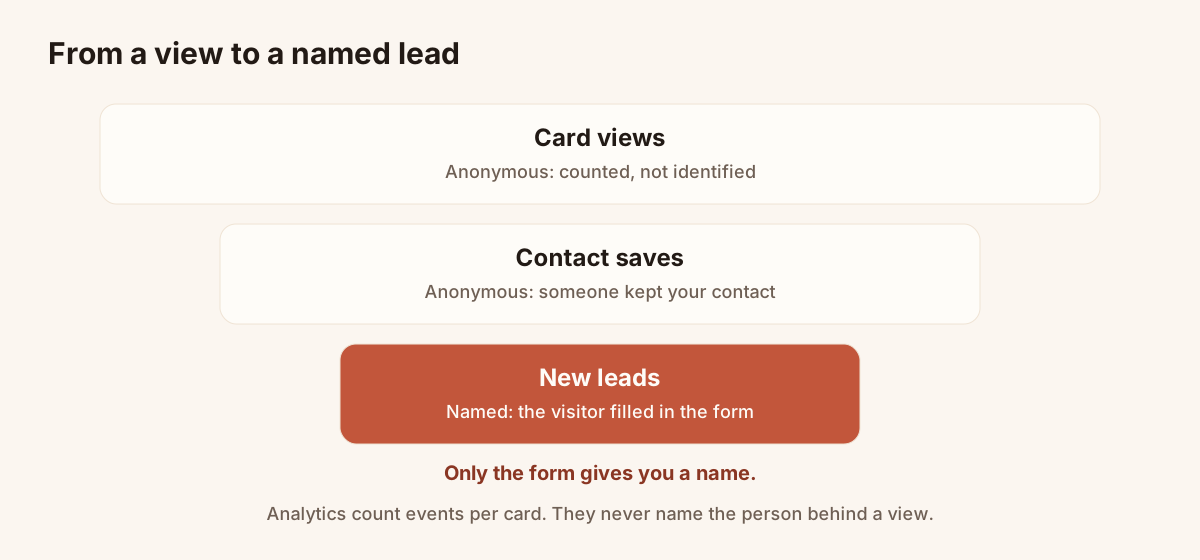
Only the form turns an anonymous view into a named lead.
A form with one or two questions converts better than a long one, so ask for the email and the single question that helps you follow up. For ideas on the questions, see the lead qualification guide.
What metrics should you track on a business card?
The analytics screen shows three numbers per card. They are enough to answer most questions.
| Metric | Count | Question it answers |
|---|---|---|
| Card views | Times the card page was opened | Is the card being seen? |
| Contact saves | Visitors who saved your contact | Do people want to keep it? |
| New leads | People who left details through the form | Does the card bring in leads? |
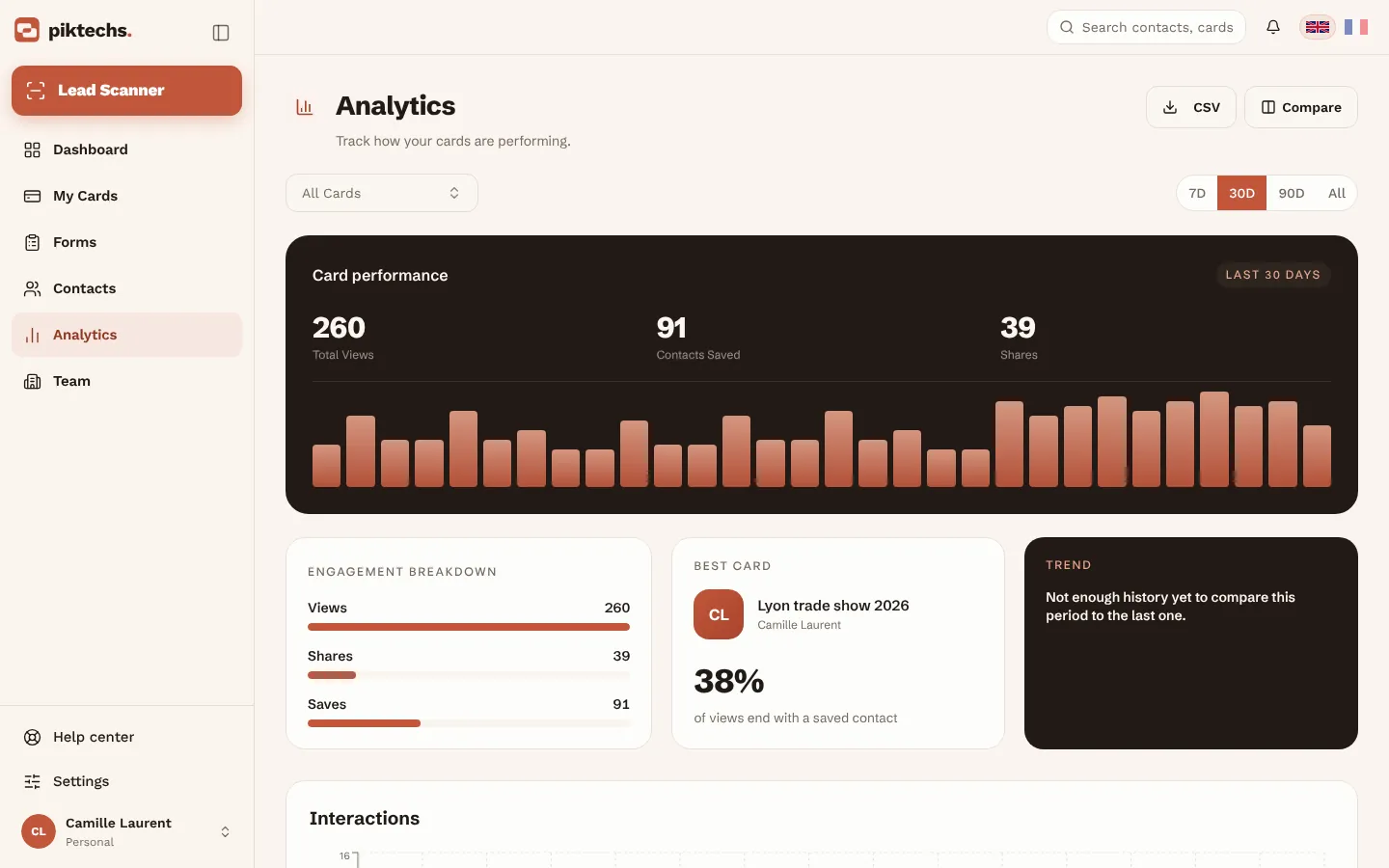
Piktechs screen, sample data.
Read the ratios, not only the totals:
- Saves per view tell you whether the card makes people keep your contact.
- Leads per view tell you whether the form is worth the visitor's time.
- Views over time tell you whether sharing is happening. A card that nobody opens has a sharing problem, not a design problem.
Analytics are a Pro and Team feature, with a 14-day trial.
Which sharing channel gets the most views: QR, NFC or link?
The help centre describes card views, contact saves and new leads. It does not describe a split of views by QR code, NFC tap or link. The privacy policy says NFC taps and clicks are counted as usage statistics tied to the card, but check on your own screen how they appear.
To compare channels with the tools you have, use one card per channel for a test period. For example, print the QR code of one card on your flyers, and share the link of another card by email. Compare the views and leads of each card over the same weeks. This works if your plan allows enough live cards: Pro allows five, Team five per seat. Drafts are unlimited and do not count.
A few rules keep the comparison honest:
- Compare over the same period.
- Give each card the same form.
- Do not change the card halfway through the test.
- Look at leads before views. A channel with fewer views and more leads wins.
To pick the right channel, read how to generate a QR code for a business card.
A weekly routine to read the numbers
Open the analytics once a week, on the same day, and answer four questions in order.
- Did views go up or down compared with last week? If they fell, you shared the card less. Share it again before you change anything.
- Did saves follow the views? If views are high and saves are low, the card does not give people a reason to keep your contact. Review the photo, the job title and the first lines.
- Did leads follow the views? If saves are fine and leads are low, the form is the issue. Shorten it, or ask the key question first.
- Which leads need a call today? Open Contacts, sort by priority and set a follow-up reminder.
Write the three numbers in a note each week. After a month, you see a trend, and a trend is worth more than a single high day.
How to measure trade show ROI from business cards
Analytics tell you how a card performs. For a show, you also need to know which leads came from it. Piktechs gives you three tools.
- Tag the show. Add the show's name as a tag when you qualify each lead.
- Filter and export. In Contacts, filter by tag, by date and by member, then export the selection as a CSV.
- Count and compare. Count the leads, and the leads you rated High, then compare with the cost of the stand.
The cost and the revenue are your own numbers. Piktechs does not compute a return for you. Piktechs gives you the list of leads of one show, with their source and priority, so that your follow-up results can be traced back to the show. The article on digital business cards at trade shows shows the whole routine.
A simple table to fill in after each show:
| Line | Your number |
|---|---|
| Cost of the show | Stand, travel, materials |
| Card views during the show | From analytics |
| Leads captured | From Contacts, filtered by tag |
| Leads rated High | From Contacts |
| Meetings booked | From your CRM |
| Deals won | From your CRM |
How to compare card performance across a team
On a Team plan, each member has their own cards, and leads are assigned to a member or a group. To compare people fairly:
- Compare leads per member. In Contacts, filter by member for the same dates.
- Compare views and saves card by card. Each card has its own analytics.
- Use the same form on every card. Otherwise the lead numbers measure the form, not the member.
- Lock the look with the brand kit. It keeps colours, logo and style the same on every card, so a difference in results is not a difference in design.
Use the figures to help, not to rank. A rep with fewer views may work in a field with fewer shared cards. Ask the rep about their routine before you draw a conclusion. The article on digital business cards for teams covers roles and assignment.
Analytics sit inside the digital business card product, with the Pro and Team plans.
Frequently asked questions
Can I see the name of the person who viewed my card?
No. Analytics count views per card and do not identify the visitor. A person becomes known only when they leave their details in the form.
What do Piktechs card analytics show?
Card views, contact saves and new leads, per card.
Does the visitor need an account or an app?
No. The card opens in any phone's browser, and the visitor installs nothing. Public business cards are never measured by Google Analytics, as the privacy policy states.
Are analytics included in the free plan?
No. Analytics are part of Pro and Team, with a 14-day trial.
How do I know which leads came from a trade show?
Tag each lead with the show's name when you qualify it, then filter Contacts by tag and date and export a CSV.
Read next
 Guide
CRM mobile app: features, offline use and integrations
Definition of a mobile CRM app, features to expect, offline use, integrations and team rollout, with the place of Piktechs next to your CRM.
 Article
How to Connect Your Digital Business Card to HubSpot and Your CRM
Send every contact from your digital business card to HubSpot, Odoo or another CRM through Zapier or Make, with the source, notes and consent attached.
Scan your first card today
Pro includes Lead Scanner, forms and Contacts. 14-day trial.