Create a Free Digital Business Card
A free digital business card is available today: the Free plan of Piktechs gives you one live card, with a QR code, a link and support for NFC tags. It has no time limit and asks for no credit card. The person who receives it installs nothing and saves your contact in one tap.
To understand the principle before you build yours, read the guide on how digital business cards work. This page covers the free plan, the steps to create the card, sharing and the limits to know.
Contents of the Free plan
Free is a plan in its own right, not a trial that ends. Here is its exact content, point by point:
- One live card. One published card at a time. Drafts are unlimited: only published cards count.
- No time limit. Free does not expire. There is no end date.
- No credit card. Signing up asks for an email address.
- QR code, link and NFC. Three ways to share the same card.
- Contact save (vCard). The visitor adds your details to their address book in one tap.
- Three layouts and five themes. Enough for a readable card in your basic colours.
- French and English. The app and the card exist in both languages.
You can edit the card whenever you want. The QR code, the link and the NFC tag stay the same: an update is live as soon as you save, with nothing to reprint or resend.
To measure the gap with the paid plans, see the Piktechs pricing page. The table further down sums up the differences.
Create a free digital business card in six steps
Get a photo of yourself, facing the camera, your name, job title, company, a phone number, an email address and the links that matter. Creating the card takes a few minutes, with no technical skill. You do it from a browser, on a computer or a phone.
- Open an account. Sign up with your email address. No credit card is asked.
- Click “New Card”. In “My cards”, pick a template to start from.
- Fill in the profile. Add the photo, name, job title, company and a short bio.
- Add your contact details and links. Keep the number and email you really want to receive. Stick to three or four links.
- Pick a style. Choose a theme with good contrast between text and background.
- Save, then publish. Until the card is published, it is a draft that nobody can open.
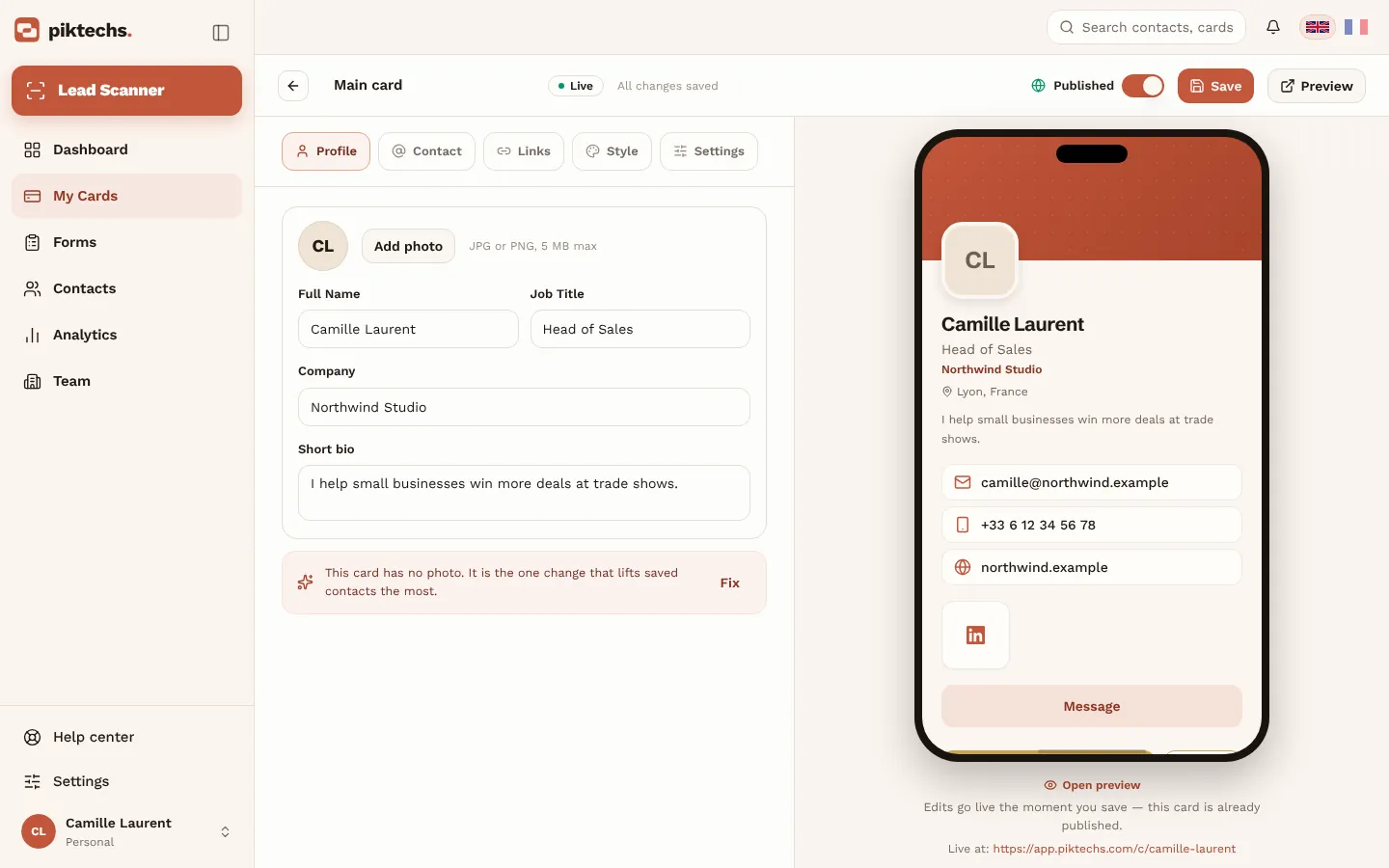
Piktechs screen, sample data.
For a full walkthrough with a screenshot at each step, read how to create a digital business card.
Who the free card suits
The Free plan fits a freelancer, a job seeker, a student or an employee who wants one clean way to hand over their details at meetings, events or on a call. It also suits anyone who wants to test the idea before paying: you build the card, share it for a few weeks and see whether people save your contact. If the answer is yes and you need to capture the details of the people you meet, Pro is the next step. If not, you keep the card you have, at no cost.
Share your card: QR code, link and NFC
Once the card is published, open “My cards” and click “Share”. The QR code, the link and the NFC tag all lead to the same card.
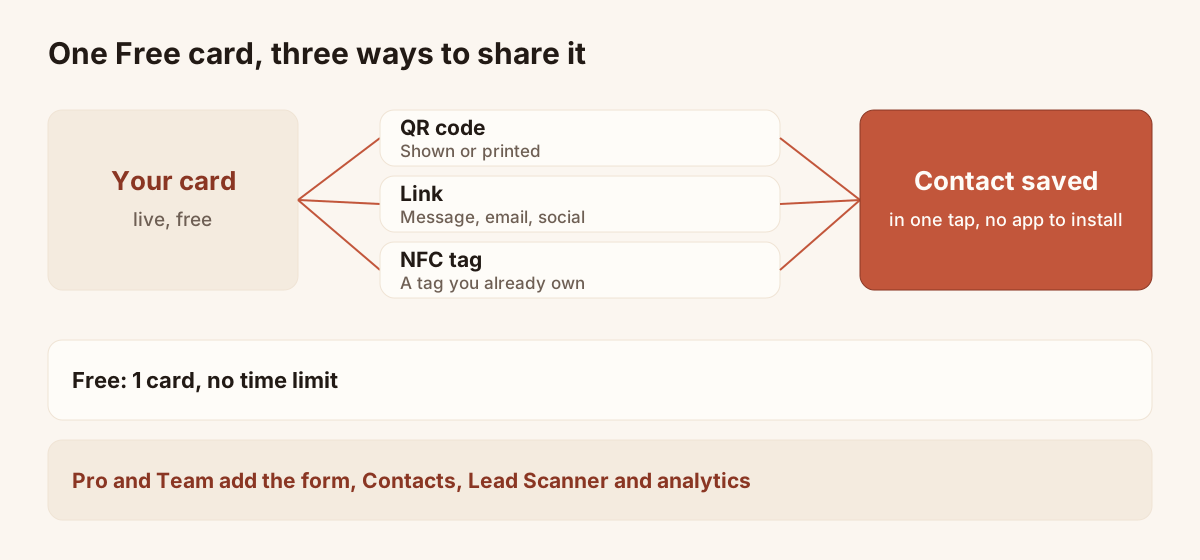
One live card, three paths to open it.
- QR code. Show it on your phone: the other person scans it with their phone camera. You can also download the QR code as an image, to print it or to place it in a document.
- Link. Copy it and paste it into a message, an email or a social profile.
- NFC tag. Piktechs does not sell a physical NFC card. If you already own an NFC tag or card, tap it with your phone. If it is not linked yet, Piktechs asks you to sign in, then to pick the card it should open. From then on, every tap opens that card. NFC works on recent iPhone and Android phones.
The visitor opens the card in their phone browser. They download no app. To compare the ways of sharing, read how to share a digital business card.
Free, Pro, Team: the plans table
The table takes its facts from the pricing page. Drafts are unlimited everywhere: only live cards count.
| Plan | Price | Live cards | Form, Contacts, Lead Scanner, analytics |
|---|---|---|---|
| Free | €0, no time limit, no credit card | 1 | No |
| Pro | €9 a month or €84 a year, 14-day trial | 5 | Yes |
| Team | €15 per seat per month, 3 seats minimum, 14-day trial | 5 per seat | Yes, with leads assigned to members |
All three plans include the QR code, the link, NFC support and contact save. Pro and Team also add custom colours, logo and banner, the gallery, reviews, map and booking, a custom address and no Piktechs badge. Team adds your own domain, a locked brand kit, roles and team analytics.
Limits of the free plan
Free is for sharing a card and being saved in one tap. It is not for capturing and following up leads. Four features are reserved for Pro and Team:
- The reply form. On Free, the card has no form for the visitor to leave their details.
- Contacts. The screen that gathers the people you captured, with priority, tags, notes and follow-ups.
- The Lead Scanner. Reading the paper cards you receive.
- Analytics. Tracking of views and contact saves.
Free also limits customisation: custom colours, logo and banner are Pro options, and the Piktechs badge stays on the card. You have one live card: to run a work card and a personal card together, you need Pro.
One practical point: if you stop a paid subscription, you go back to Free. One card stays online, the others go offline and Pro features are suspended. If you come back within 90 days, your cards are restored as they were.
When to move to Pro
Stay on Free as long as your need is to hand over your details. Move to Pro when one of these cases appears:
- You want visitors to leave their details and answers on the card, with a form.
- You want to find the people you met in Contacts, with a priority, tags, notes and follow-ups.
- You receive paper cards and want to read them with the Lead Scanner.
- You want to see how many times your card was opened.
- You need several cards, up to five, or a card in your own colours without the Piktechs badge.
- You want to send your leads to HubSpot or Odoo, through Zapier or Make, or export a CSV file.
Pro has a 14-day trial with no commitment: you cancel in one click. For a team of three or more, with a shared brand kit and assigned leads, look at Team. For the sales use of the card, open the digital business cards page. For the definition of the tool, read the definition of a digital business card. To weigh the pros and cons against paper, read the pros and cons of digital business cards.
Frequently asked questions
Is a digital business card really free?
Yes. The Free plan of Piktechs gives you one live card with a QR code, a link and NFC support, with no credit card. Paid plans add features, they do not decide whether the free card works.
How long does the card stay free?
With no time limit. Free has no end date. The 14-day trials apply only to Pro and Team: they ask for a payment method, and you can cancel before the end without being charged.
Does the person who receives my card need an app?
No. They open your card in their phone browser, from a QR scan, an NFC tap or a link. They save your contact in one tap, with nothing to install.
Can I change my card later?
Yes, whenever you want. Click “Edit” in “My cards”, change the detail and save. The QR code, the link and the NFC tag point to the same card, so there is nothing to share again.
Can I use my own QR code on a printed card?
Use the QR code of your Piktechs card: download it as an image and hand it to your printer. It points to your live card, so your changes appear without reprinting. A QR code from another tool would lead to that tool, not to your Piktechs card.
Read next
 Guide
How Do Digital Business Cards Work? QR Codes, NFC, Links and vCards Explained
QR code, NFC, link or vCard: see how digital business cards work, how contacts get saved on iPhone and Android, and how leads follow.
Create your digital card
The Free plan includes one live card. No app needed for the people who receive it.