What Is a vCard? How to Create One (and Why a Digital Card Beats a .vcf File)
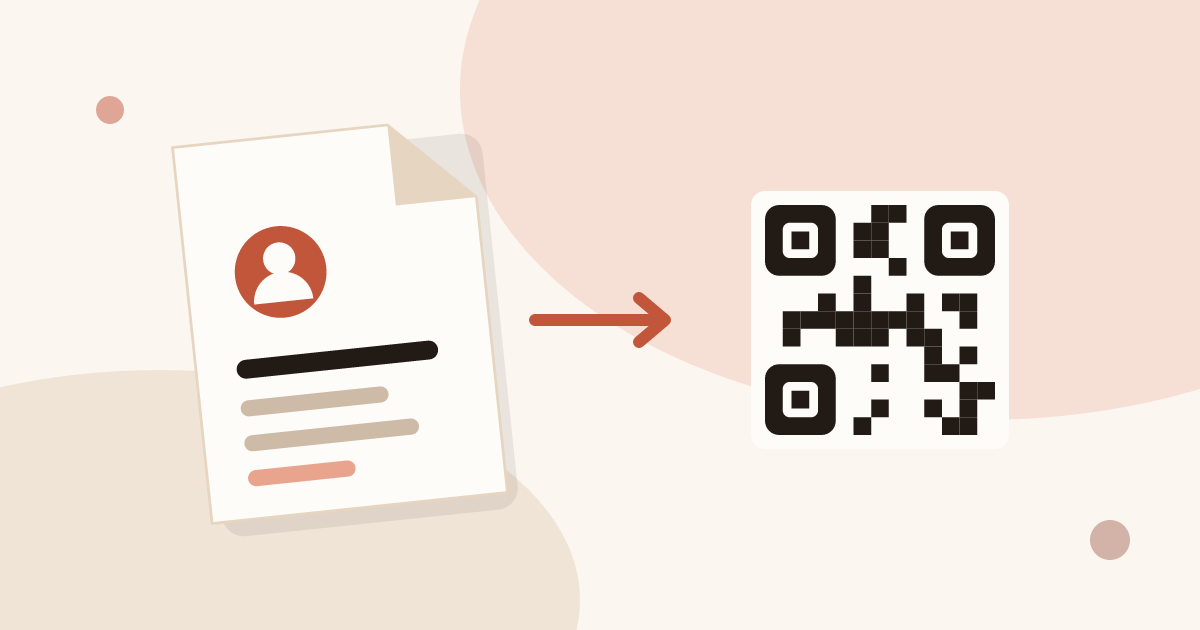
A vCard is a file with the .vcf extension that holds one person's contact details: name, company, phone, email, website. Opening it on a phone or computer offers to add that person to the address book. You can write one in a text editor in five minutes, as shown below.
It is also the format behind the "save contact" button of a QR code business card. The sections below cover the file itself, the steps to create it, and its limits.
How to create a vCard
A vCard is plain text. Any editor works: Notepad on Windows, TextEdit in plain text mode on a Mac, or a code editor. You write a few lines, save the file with the .vcf extension, and send it.
Each line has a property name, then a colon, then the value. The file starts with BEGIN:VCARD and ends with END:VCARD. Between them you list the properties. Here is a complete vCard 3.0 for a fictional person:
BEGIN:VCARD
VERSION:3.0
N:Laurent;Camille;;;
FN:Camille Laurent
ORG:Atelier Nova
TITLE:Sales Manager
TEL;TYPE=WORK,VOICE:+33 1 23 45 67 89
EMAIL;TYPE=WORK:[email protected]
URL:https://www.example.com
END:VCARD
The next section explains each line. Save the text as camille-laurent.vcf, with UTF-8 encoding so accents survive.
How to make a vCard: the fields one by one
| Property | Role | Example |
|---|---|---|
BEGIN and END | Open and close the card | BEGIN:VCARD |
VERSION | Format version: 3.0 is read almost everywhere | VERSION:3.0 |
N | Structured name: family name, given name, additional names, prefix, suffix | N:Laurent;Camille;;; |
FN | Full name as displayed | FN:Camille Laurent |
ORG | Company | ORG:Atelier Nova |
TITLE | Job title | TITLE:Sales Manager |
TEL | Phone number, with a type | TEL;TYPE=WORK,VOICE:… |
EMAIL | Email address, with a type | EMAIL;TYPE=WORK:… |
URL | Website or profile link | URL:https://… |
Three points trip people up:
NandFNare both required in version 3.0.Nis split by semicolons in a fixed order, family name first.FNis the text shown in the contact list.- Empty parts keep their semicolons.
N:Laurent;Camille;;;has five parts, three of them empty. - Each line is its own property. Do not break a value across two lines.
Other properties exist: ADR for an address, NOTE for free text, PHOTO for a picture encoded in the file, BDAY for a birthday. Add only the details the other person should keep. A card with six lines is easier to read than one with twenty.
How do I create a vCard without writing code?
Three routes need no hand-typed file.
- Export from your own contact. On a computer, most address books export a contact as a .vcf file. On a phone, the share option of a contact usually offers the same file. Menu names vary with the app and the system version.
- Use a vCard generator. Online tools show a form: you fill in the fields and download the .vcf. Check that the tool does not store the fields you type, since the file holds your phone number and email.
- Create a digital card. You fill in a profile once, and the card gives visitors a save button that adds your details to their phone. No file to write or to attach.
The third route is the one Piktechs takes. When someone opens your card, the contact is saved in one tap (vCard), and the person installs nothing. The steps to build the card are in how to create a digital business card.
How to use a .vcf file once it exists
A .vcf file does nothing until someone opens it. Four common uses:
- Email attachment. The recipient opens the file and the phone or mail client offers to add the contact.
- Message or download link. Host the file on a page and share the link. It works if the recipient taps and opens it.
- Import into an address book. Outlook, Google Contacts and Apple Contacts all import .vcf files. A single file can hold many contacts: paste several
BEGIN:VCARDtoEND:VCARDblocks one after another. - QR code. Put the vCard text inside a QR code. A phone camera reads it and offers to add the contact, with no network needed.
The QR route has a practical limit. The more text in the code, the denser and harder to scan it becomes. Keep the fields short: name, company, one phone number, one email. Printing a dense code on a small card produces a code the camera struggles to read. Size and placement rules are in the article on putting a QR code on a business card.
Why a digital card beats a .vcf file
A .vcf file is a snapshot. Once you send it, the copy lives on the other person's phone and you cannot change it. A digital card is a page that you can edit, and the contact is generated from the current version.
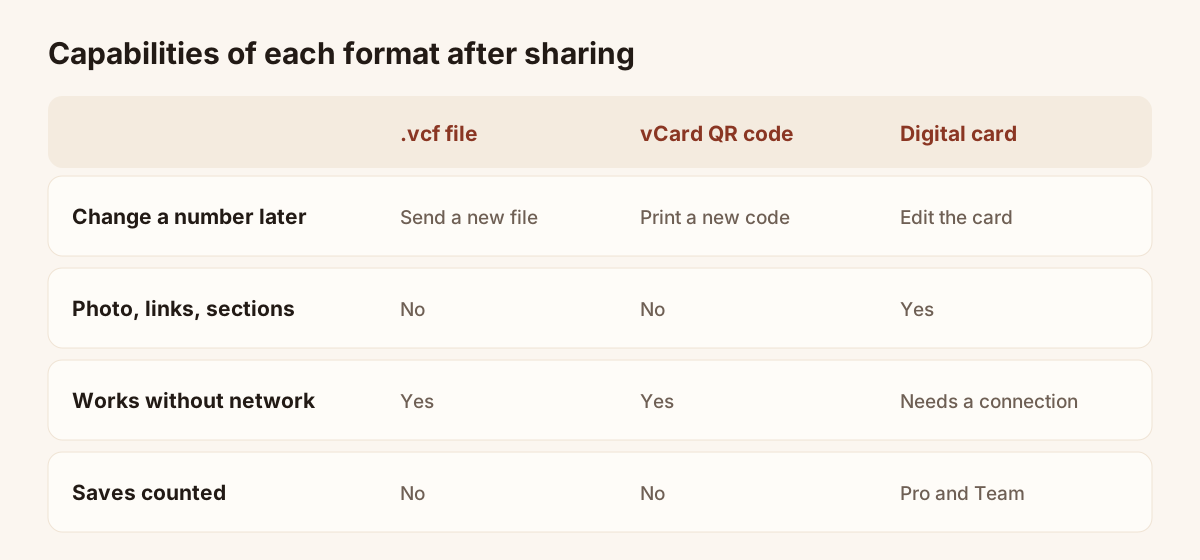
Capabilities of each format after sharing.
Here is the practical difference:
| Need | .vcf file | vCard QR code | Digital card |
|---|---|---|---|
| Change a phone number later | Send a new file | Print a new code | Edit the card, same link and code |
| Show more than contact fields | No | No | Photo, links, sections |
| Works offline when scanned | Yes, once received | Yes | Needs a connection to open the page |
| See how many people saved it | No | No | Analytics on Pro and Team |
| Recipient installs something | No | No | No |
The offline row is the one case where the plain file wins. If you hand cards out in places without signal, a vCard QR code reads anywhere. A digital card needs the phone to load the page.
For everything else, the card is easier to keep right. If you change company or number, you edit the card and every printed QR code and link keeps working. With a file, you chase every copy you ever sent. The guide on how digital business cards work explains the full mechanism, from QR code to saved contact.
Piktechs fits this role. The Free plan gives you one live card. Pro adds analytics, which show card views, contact saves and new leads. Plans and prices are on the digital business cards page.
vCard versions: 2.1, 3.0 and 4.0
Three versions are in use. Version 2.1 is old and appears in files exported by older phones. Version 3.0 is the safe choice: Apple Contacts, Google Contacts and Outlook all read it. Version 4.0 adds features and a cleaner text encoding, but support is less even across tools. If you write a file by hand to send to many people, use 3.0.
Whatever the version, the receiving app decides which fields to keep. Some apps drop fields they do not know, such as custom properties. Stick to the standard fields in the table above and the contact arrives complete.
Common mistakes in a hand-made vCard
Most failures come from a few small errors:
- A missing
END:VCARD. The phone cannot parse the card and ignores it. - Wrong file extension. A file named
contact.vcf.txtopens as text. Show file extensions in your system to check. - Accents turned into odd characters. Save in UTF-8.
- Spaces before the property name. Start every line at the left edge.
- A phone number without the country code. The number works in your country and fails abroad. Write it in international format, with the plus sign.
- Extra personal data. A birthday or home address in a card you send to strangers is more than they need.
Open the file on your own phone before you send it. If your phone offers to create the contact with the right name and number, the file is valid.
Frequently asked questions
What does vCard stand for?
It stands for virtual card. The format was designed to exchange electronic business cards between address books and email programs. Versions 2.1, 3.0 and 4.0 exist, and 3.0 is the one most tools read without trouble.
Can I turn a vCard into a QR code?
Yes. Many generators accept the vCard text and return a QR code. A phone camera reads it and offers to add the contact. The code is fixed: if your details change, you need a new code. A digital card avoids this because the code points to a page you can edit.
How do I open a .vcf file on iPhone or Android?
Tap the file in an email or a message. The phone usually offers to create the contact. If it does not, import the file from the Contacts app of your system. Menu names depend on the system version.
Is a vCard the same as a digital business card?
No. A vCard is a file with contact fields. A digital business card is a page that also offers a save button, links and sections, and that you can update after sharing it. Many digital cards generate a vCard when the visitor saves your contact.
Read next
 Guide
QR Code Business Cards: Definition and How to Make One
A QR code business card opens your details on any phone. Learn how to make one in minutes and pick the link: a vCard, a website or a live digital card.
 Article
How to Create a Digital Business Card (Step by Step, Free)
Create a free digital business card in 5 steps: pick a layout, add your links, share it by QR code or NFC. No app needed for the people you meet.
 Article
How to Create a Contact Card on iPhone and Android (and Share It)
Set up your contact card on iPhone or Android, share it with NameDrop or a QR code, and know when a digital card works better.
 Article
How to Update a Digital Business Card (No Reprint Needed)
Changed jobs, phone number or title? Update your digital business card in seconds: every QR code and link you have shared stays valid.
 Article
How to Share a Digital Business Card: 7 Ways (QR, NFC, Link, Email, Text)
QR code, NFC tag, link, text, email, signature, QR code on a slide: 7 ways to share a digital business card and get details back.
 Article
Free QR Code Business Card Generator: Static vs Dynamic QR Codes
Generate a QR code for your business card for free, and learn why a dynamic QR code you can edit and track beats a static vCard code.
Create your digital card
The Free plan includes one live card. No app needed for the people who receive it.